We use cookies to ensure that we give you the best experience on our website.
PEPLINK · BRIEFLY EXPLAINED
What does SpeedFusion do?
SpeedFusion uses several suitable internet connections within a shared VPN tunnel. The three functions serve different purposes:
Bandwidth Bonding – use the bandwidth of multiple WAN connections for a shared data stream.
WAN Smoothing – send redundant packets to reduce the effects of packet loss and jitter. This requires additional bandwidth.
Hot Failover – preserve ongoing sessions through the remaining tunnel paths when a connection fails.
This requires compatible routers, a reachable endpoint, suitable WAN connections and the required features or licences. Uninterrupted availability is not guaranteed.
Underground cable and satellite: different paths, fewer shared failure risks.
Physically different internet paths can reduce shared causes of failure. A terrestrial connection and Starlink as a satellite backup are one possible example. Actual site dependencies, power, the router and an available tunnel endpoint are critical. This supports business continuity planning but does not guarantee uninterrupted operation or NIS2 compliance.
Physically separate redundancy here refers to a redundant internet connection using physical transmission paths that are as different as possible. “Air-gap redundancy” is used here figuratively to describe path diversity. An air gap in the IT security sense separates systems without a physical connection and without automated logical data transmission; two active internet connections do not provide this kind of isolation. Fibre or DSL and a Starlink connection can bypass the shared local cable route. However, routers, LAN/WLAN, power supply and location remain potential shared dependencies; satellite internet also uses ground infrastructure.
Two WAN connections may share cable routes or network nodes, even if they come from different providers. Physical route diversity can reduce these dependencies, but does not eliminate every single point of failure. Business continuity also requires consideration of end devices, power supply, internal networks and recovery procedures. NIS2, IT-Grundschutz and ISO/IEC 27001 require a comprehensive assessment appropriate to the risk.
The problem
Why two connections in the same cable route are not enough
Physical damage to network infrastructure can affect several connections at once. If two lines run through the same duct, a single instance of damage during excavation can interrupt both. Redundancy planning therefore needs to consider the actual routes of the connections – not just the number of contracts or providers.
Potential shared dependencies in dual-WAN setups:
Shared conduit: If two connections use the same cable route, damage during excavation can interrupt both at once
Shared distribution point: If both connections pass through the same infrastructure node, its failure can affect both
Shared DSLAM: Different providers may use the same access infrastructure for DSL connections
Shared last mile: The connection routes to the building must be checked for actual separation
Shared network nodes: More distant handover points can also create residual dependencies
Two connections do not automatically protect against damage to a shared cable route. An additional path using another access technology, such as satellite, cellular or fixed wireless, can reduce this risk. The suitable combination depends on local dependencies and availability requirements. No path is immune to every site or infrastructure event.
Comparison
Air-Gap vs. „Digging it yourself“
Comparing diverse access paths with shared cable routes.
Air-gapOrbit + underground cable
✓Starlink LEO + fibre
A satellite path does not use the local fibre cable route. This reduces shared cable risks, while the site, power, router, antenna and ground infrastructure still need assessment.
Shared trench2× cables in the duct
✗Two providers, one trench
If both cables share the same duct, a single excavation incident can interrupt both connections. Physically separate cable routes require their own assessment.
Technical architecture
How air-gap redundancy works with Peplink & Starlink
The example described here combines a terrestrial primary path (fibre, DSL or cable), a satellite backup path (Starlink LEO) and an SD-WAN router (Peplink). SpeedFusion also requires a reachable, appropriately sized remote tunnel endpoint, such as a compatible Peplink router or FusionHub. Features and their activation must be checked against the model, firmware and licence.
The failover process in detail: The router checks the availability of WAN paths using the configured monitoring. When a failure is detected, SpeedFusion Hot Failover can move traffic within the existing tunnel to a remaining functional path. Detection time and switchover time must be distinguished. Maintaining sessions requires a reachable remote endpoint and a suitable tunnel/routing setup; application behaviour and interruptions must be tested under real conditions.
Bonding vs. Failover: Bandwidth Bonding distributes traffic across multiple WAN paths within a SpeedFusion tunnel. Usable throughput depends on factors including the individual connections, the router and remote endpoint, and tunnel overhead. Forward Error Correction (FEC) can compensate for packet loss using additional repair data, but requires additional bandwidth and does not inherently reduce transmission latency. For backup operation, path priorities, active tunnels and data usage are planned to suit the use case and tariff.
Regulation & compliance
Physical path diversity in the context of NIS2 and IT-Grundschutz
The NIS2 Directive (EU 2022/2555) requires affected entities to implement appropriate and proportionate risk management measures. In Germany, the NIS-2 Implementation Act has been in force since 6 December 2025; § 30 BSIG sets out the corresponding obligations for essential and important entities. Whether an entity is affected must be assessed based on its activities, statutory classification and, where applicable, thresholds. Physically distinct internet routes can contribute to business continuity, but replace neither the other measures nor a comprehensive legal assessment.
NIS2 Article 21 – relevant requirements
Article 21(2)(c)
Business continuity, backup management, disaster recovery and crisis management
Article 21(2)(d)
Supply chain security, including relationships with direct suppliers and service providers
Article 21(2)(j)
Multi-factor or continuous authentication, secure communications and, where appropriate, secure emergency communication systems
Recital 79
All-hazards approach, including physical risks and telecommunications and power outages
BSI IT-Grundschutz mapping, 2023 edition: NET.1.1.A13 “Network planning” requires documented, traceable planning, including capacity sizing and redundancy. NET.1.1.A29 “Highly available implementation of network connections” addresses, where protection requirements are heightened, needs-based redundancy of connections and routes, as well as potential single points of failure and disruptive environmental conditions. Whether the specific design meets these requirements must be assessed on the basis of risk analysis, implementation and testing; Starlink alone does not automatically fulfil them.
ISO/IEC 27001:2022: The standard sets out requirements for a risk-based information security management system. Redundancy measures must match the defined availability requirements and be integrated into this overall system. Physically distinct network paths can be a technical measure, but on their own are not proof of conformity or certification.
Documentation for resilience planning
Documented connection routes and shared dependencies
Integration into business continuity planning
Defined responsibilities and recovery procedures
Risk-based assessment of the infrastructure architecture
Assessment against NET.1.1.A13 and A29 (2023 edition)
Integration into information security management
Documented failover tests for audits
Network status and event logs, where available
Failover technology
SpeedFusion Hot Failover: switching and session persistence
A WAN failure must first be detected. With conventional failover, detection and switchover times depend on monitoring intervals, thresholds and routing; a change in the public IP address can affect existing connections. SpeedFusion Hot Failover operates across multiple paths within a tunnel and can therefore maintain sessions if a path fails. This does not establish a universal switchover time.
Failover comparison: conventional routing vs. SpeedFusion
Parameter
Standard router
Peplink SpeedFusion
Detection time
Depends on health checks and thresholds
Depends on monitoring and tunnel status
Switching time
Depends on configuration and network conditions
Measure under defined test conditions
Session persistence
An IP change often requires reconnection
Possible with an available endpoint and stable tunnel
VPN stability
Depends on the VPN and routing setup
Test with a remaining path and available endpoint
VoIP quality
An interruption is possible during a path change
Depends on packet loss, jitter and remaining capacity
Requirements for session continuity: The tunnel setup must provide for multiple usable WAN paths and a reachable SpeedFusion peer. If traffic is routed over a remaining path to the same peer, the tunnel IP address can be retained. A failed router, an unreachable peer, a loss of power or insufficient remaining capacity can still interrupt applications. Detection, switchover and session continuity must be tested separately with business-critical applications.
Infrastructure design
Geographic redundancy 2.0: vertical diversity
Geo-redundancy distributes important IT components or communication paths across separate locations. It aims to reduce the impact of a local incident. When planning connectivity, it remains essential to establish which parts are actually separate and which dependencies persist at the site or at remote endpoints.
Geographic separation can use data centres in different locations or cables on different routes. Shared building entries, distribution nodes or power supplies can limit separation. The last-mile route must therefore be examined rather than assumed to be identical.
The combination referred to here as vertical diversity adds a satellite path to a terrestrial connection. Damage to a local cable route therefore does not automatically affect both connections. However, incidents affecting the shared site can still impair the antenna, cabling, router or power supply. The satellite connection also depends on functioning satellite, ground and remote endpoint infrastructure.
Starlink LEO as a backup medium: Starlink uses satellites in low Earth orbit and optical links between satellites. In this example architecture, the service is planned as a backup. Usable capacity and latency depend on factors including the tariff, location, load, sky visibility and installation. A suitable installation location, functioning cabling, power and an active tariff appropriate to the use case are required; suitability for the required applications must be tested.
Detailed comparison
Conventional connections vs. air-gap: detailed parameters
Parameter
2× cable: shared routes possible
Air-gap (Starlink + cable)
Physical separation
Not provided if cables share a duct
Different access paths; assess local dependencies
Protection against excavation damage
Both may be affected if they share a route
Bypasses the local cable route
Failover time
Depends on monitoring and routing
Determine in tests with an active tunnel and remaining path
Session persistence
Sessions may break if the IP address changes
Possible with the same tunnel endpoint
Contribution to NIS2 risk management
Assess only within the overall concept
Technical measure, not a compliance guarantee
Flood and storm protection
Depends on routes and site protection
Antenna, power and site can be affected
VPN stability
Depends on VPN and routing design
Test with a functioning endpoint and remaining path
Central management
Depends on the management solution used
InControl2 with compatible devices and valid entitlement
Audit documentation
Documentation and tests required
Event logs can support documentation
Cost-effectiveness
ROI calculation: what does an outage really cost?
Investment in physically separate redundancy often pays for itself after just one prevented outage. According to a study by Allianz Global Corporate & Specialty, an IT outage costs medium-sized businesses an average of €5,600 per minute. For a typical outage caused by cable damage lasting 4–8 hours, the losses total 1.3 to 2.7 million euros.
Cost comparison: outage vs. air-gap investment
Average cost of an outage (4h)
~1.344.000 €
Peplink Balance 380X (one-off)
~2.500 €
Starlink Business (monthly)
~75 €/month
SpeedFusion licence (annual)
included with the router
Total costs in year 1
~3.400 €
ROI from one prevented outage
39.429%
Even with a more conservative assessment (a smaller company, a shorter outage), the potential losses exceed the investment costs many times over. There are also indirect costs: reputational damage, lost customer orders, SLA penalties and lost employee productivity during the outage.
Deployment scenarios
Air-gap redundancy in practice
SMEs & manufacturing
ERP and cloud: plan a backup connection
An additional satellite path can support important ERP, VoIP and cloud applications when the local cable connection fails. Which applications remain usable depends on remaining capacity, tunnel configuration, the endpoint and power. Switching and application behaviour must be tested before deployment.
Critical infrastructure & healthcare
Risk-based resilience planning
wirelessmaxx addresses preventive connectivity and resilience needs, for example for hospitals, utility providers and the energy sector. Its sister company Hypria is intended for operational needs of fire services, THW and other relief and emergency response organisations. This company division is not an official KRITIS sector classification or protection priority. Legal applicability and required measures must be assessed separately; a backup connection alone does not prove NIS2 compliance.
Branch networks & retail
Centrally managed multi-site failover
Branch networks can provide an additional WAN path and suitable failover rules at each site. InControl2 supports central configuration and monitoring for compatible devices with valid entitlement. Connectivity, permissions, rollout procedures and tests are planned for the specific network; no fixed site count or universal remote serviceability is promised.
Disaster recovery & business continuity planning
Communication during natural disasters
Flooding, storms and power outages can affect terrestrial networks and the local site at the same time. A satellite path can support communications if the antenna, cabling, power and satellite service remain operational. A UPS or generator must be sized for demand and required runtime; such a setup still cannot exclude outages.
Construction & temporary sites
Temporary connectivity without a fixed-line connection
Satellite access may suit construction sites, pop-up stores and temporary offices without installing a new fixed-line connection. Installation site, activation, service plan, integration and power must be agreed in advance. Peplink and additional LTE/5G paths can be added when appropriate; provisioning time and usability at the next site require specific assessment.
Logistics & supply chain
An additional connection path for supply chain IT
WMS, track and trace and EDI communications can benefit from an additional internet path. Physical path diversity reduces the risk of shared cable failures. Whether goods receipt, order picking and shipping can continue during a disruption also depends on the applications, local systems and remaining connection.
Implementation
Step by step: Air-Gap in 5 phases
1
Inventory & risk analysis
Document the existing WAN infrastructure: which providers and routes are used? Where are shared weaknesses? Which systems are business-critical? Which SLAs apply?
2
Connection, service plan and hardware planning
Assess connectivity needs, site and applications with connecting.works GO. Check the Peplink model, firmware, SpeedFusion activation and tunnel endpoint against throughput and feature requirements. Starlink terminals are offered only with a service plan and service appropriate to the deployment. Power and any required UPS must be sized for the necessary runtime.
3
Installation & configuration
Assess a Starlink installation site with an unobstructed sky view and safe mounting, and plan cabling and power. Configure WAN priorities, active SpeedFusion tunnels to an available endpoint and monitoring parameters for the specific setup.
4
Failover testing & documentation
Carry out planned primary-link failure tests, measure detection and switching separately and check session persistence with key applications. Document conditions, remaining capacity, results and residual risks; this supports but does not replace the overall assessment.
5
Monitoring & ongoing optimisation
Set up monitoring and event notifications in the available management system. Plan recurring failover tests, performance checks and configuration reviews with defined responsibilities and suitable intervals; do not assume that automated tests are a universal InControl2 feature.
Hardware
Peplink router examples for air-gap planning
Check Starlink Ethernet integration and the required WAN/SpeedFusion features for the specific terminal, Peplink model, firmware and activations. The existing overview lists example models, not universal user capacity or performance commitments; sizing depends on applications, tunnel throughput and deployment conditions.
Category
Models
Air-gap suitability
Sizing
Enterprise
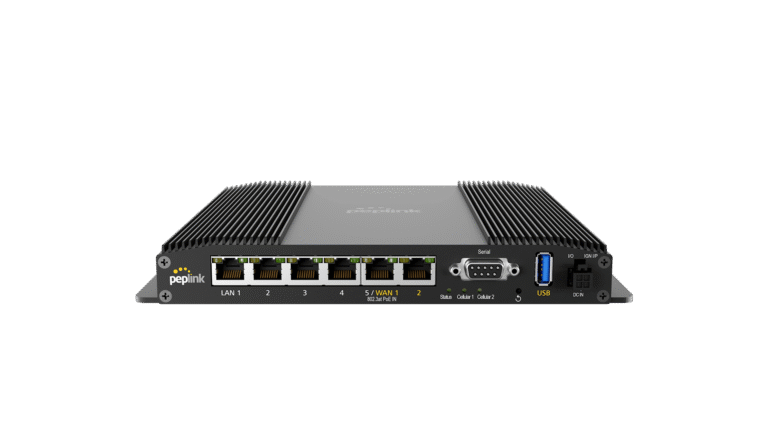
Balance 310X, 380X, 580X, 710
SpeedFusion Bonding + Hot Failover
Based on demand and tunnel throughput
Branch
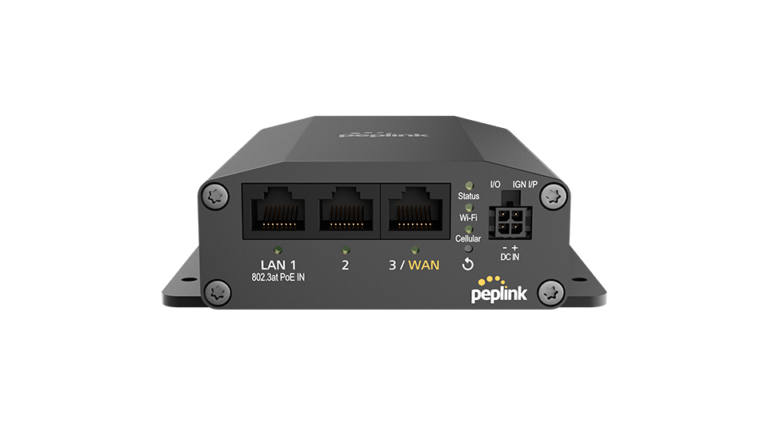
B One, B One 5G, B One Plus
Starlink backup for branches
Based on applications and WAN demand
Mobile
BR1 Pro 5G, BR2 Pro 5G, Transit Pro
Starlink + LTE for mobile sites
Based on mobility and deployment profile
Rugged
MBX 5G
Assess environmental and installation conditions
Based on environmental and performance needs
Frequently asked questions
FAQ: physically separated redundancy
What exactly does “Air-Gap“ mean in the context of network redundancy?
In this glossary, “air-gap redundancy” is a figurative term for physically diverse internet paths. In information security, an air gap instead refers to isolated systems without automated data connectivity. Satellite and underground cable can reduce shared cable risks, but the router, power, site and other infrastructure can remain common causes of failure.
Can Starlink be a company’s only internet connection?
Depending on the location, service plan and application needs, Starlink can be used as a primary or backup access service. This example treats it as an additional backup path. Sustained heavy workloads or binding availability requirements call for individual assessment of usable capacity, data conditions and residual failure risks; a single access link does not provide path redundancy.
How fast is failover from fibre to Starlink?
A universal switching time below 50 milliseconds cannot be substantiated without a documented test. Detection, tunnel status, router model, firmware, configuration, licence, endpoint and a remaining usable WAN path affect the process. SpeedFusion Hot Failover can preserve sessions within the existing tunnel; its actual effect must be tested with key applications.
Is air-gap redundancy mandatory under NIS2?
NIS2 does not prescribe a specific satellite technology or a universal requirement for “air-gap redundancy”. Article 21 requires risk-appropriate measures, including business continuity, backup and crisis management; in Germany, section 30 BSIG is relevant. Whether and what path redundancy is required depends on applicability, risk analysis and the overall concept, not the choice of a single product.
What determines the cost of an air-gap solution with Peplink and Starlink?
Costs depend on connectivity needs, Peplink model, Starlink terminal, suitable service plan and service, installation, backup power and any required SpeedFusion/InControl2 entitlements and tunnel endpoint. No universal price or included licence is promised here. Connection planning with connecting.works GO establishes the required components and agreed scope of service.
Does Starlink require specific permissions or mounting?
The antenna requires suitable mounting, an unobstructed sky view, safe cabling and power. Whether building procedures, owner consent or other requirements apply must be assessed for the specific location and mounting method. No universal permit exemption is claimed here; consult the relevant authorities and qualified planners where necessary.
Can I centrally manage air-gap redundancy across multiple sites?
InControl2 can centrally configure and monitor compatible Peplink devices and support event notifications and remote access. It requires suitable devices and firmware, valid entitlements and available management connections. The specific features and scaling must be assessed for the branch network.
Is your IT ready for an emergency?
Let us review your connection routes, applications and remaining dependencies. The connectivity planning with connecting.works GO starts with your requirements and aligns integration and support with the agreed solution. Starlink terminals are offered exclusively with a suitable tariff and service; the overall legal assessment remains separate.