We use cookies to ensure that we give you the best experience on our website.
PEPLINK · BRIEFLY EXPLAINED
What does SpeedFusion do?
SpeedFusion uses several suitable internet connections within a shared VPN tunnel. The three functions serve different purposes:
Bandwidth Bonding – use the bandwidth of multiple WAN connections for a shared data stream.
WAN Smoothing – send redundant packets to reduce the effects of packet loss and jitter. This requires additional bandwidth.
Hot Failover – preserve ongoing sessions through the remaining tunnel paths when a connection fails.
This requires compatible routers, a reachable endpoint, suitable WAN connections and the required features or licences. Uninterrupted availability is not guaranteed.
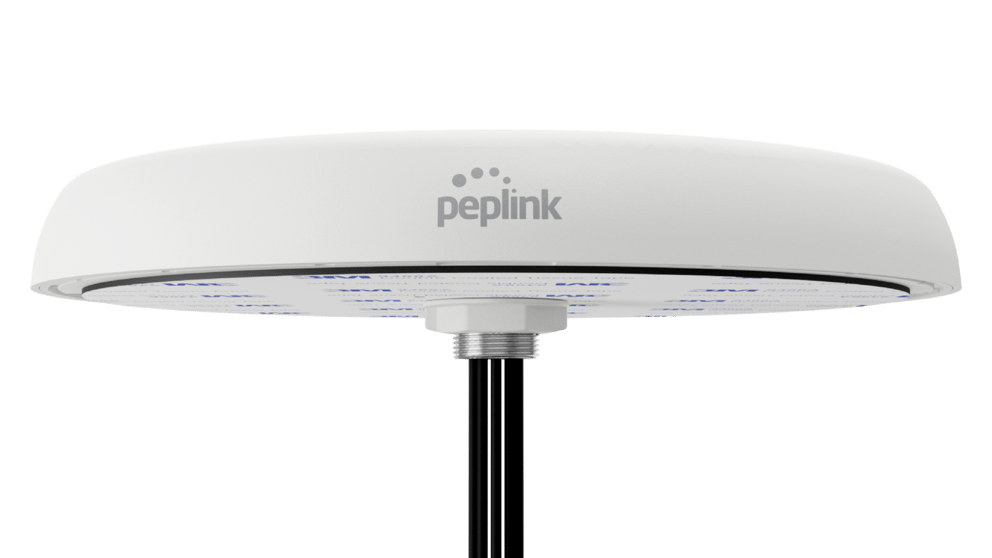
5G/LTE antennas and router accessories include external mobile antennas, Mobility antennas, cables, adapters, brackets, PoE/switch components, power supplies, protective enclosures and additional network components. Your choice affects reception and operation at the actual site. We cover general network equipment such as switches, PoE and power supplies under Network accessories for Peplink and Starlink; this page focuses on antennas, reception and RF cables.
In business deployments, accessories are more than an optional extra. Suitable antennas, mounting and power supplies can improve operation in equipment rooms, vehicles or on construction sites and support the integration of Starlink or cellular connections into a business network. Continued connectivity also depends on network coverage, network load, service plans and power supply.
02 · STANDORT / MONTAGE / KABEL
Why antenna planning matters
Cellular reception depends on the location. Building envelopes, metal containers, vehicles, machinery, hills, distance to the cell tower and network load affect signal quality and stability. An external antenna can help move reception away from an unfavourable indoor environment to a better reception point. At the same time, excessively long or unsuitable cables can reduce an antenna’s gain.
Ericsson describes Wireless WAN and 5G as important building blocks of modern enterprise connectivity (Ericsson Mobility Report). For these concepts to work in practice, routers, antennas, cables and mounting must be compatible. A poorly positioned antenna can make a good router part of an unstable setup; a well-planned antenna can help establish a robust connection even at challenging sites.
Planning area
Key question
Relevance
Location
Where is the best reception point?
Determines signal quality and stability.
Mounting
Roof, mast, wall, vehicle or temporary mount?
Affects weather protection, visibility and maintenance.
Cables
What attenuation occurs at the frequencies used over the planned cable length, including adapters?
Helps avoid cable losses and unsuitable connections.
Router
Which frequency bands, MIMO port count and exact connector variants are required according to the datasheet?
Allows antennas, cables and routers to be matched.
Applications
Fixed, mobile, temporary or outdoor?
Determines the design, protection rating and accessories needed.
Choosing antenna types, connectors and cables
First, check reception at the intended mounting point. For a fixed site with a known cell tower direction, an aligned directional antenna may be suitable; for changing reception directions or vehicles, an omnidirectional or mobility antenna may be more appropriate. Design, orientation and mounting must suit the environment.
Then check the required frequency bands, the number of mobile MIMO connections and the exact connector variant against the datasheets for the antenna and 5G router . Observe the port assignments specified by the router manufacturer and the installation instructions; connectors that look the same are not automatically compatible.
Finally, check the attenuation specified in the cable datasheet at the frequencies actually used for the full cable run, including adapters. A good reception point can lose its advantage through high cable losses. There is no universally valid maximum cable length or guaranteed reception gain.
03 · HYBRIDE KONNEKTIVITÄT
Plan antennas, routers and Starlink accessories together
Many projects now combine several connection technologies. A construction site may use Starlink for satellite internet, 5G/LTE as backup and a Peplink router for failover. A vehicle may need a mobility antenna for cellular connectivity, a router for VPN and optionally Starlink while stationary. A branch may use an outdoor antenna for 5G backup and Starlink for additional redundancy.
Peplink describes SpeedFusion as a technology that can combine WAN sources such as 5G, satellite and wired connections into a resilient connection (Peplink: SpeedFusion Bonding Technology). Antenna and accessory planning provide a physical foundation for this. Failover requires at least one remaining operational WAN connection and a power supply. SpeedFusion bonding requires multiple suitable WAN connections, a reachable tunnel endpoint and appropriate features and service plans; an antenna alone does not provide resilience.
04 · FEHLER VERMEIDEN
Common antenna and accessory mistakes
A common mistake is to focus only on an antenna’s gain figure. What matters is whether the antenna suits the frequency range, router connector, mounting point, cable route and intended use. A second mistake is mounting without a prior site assessment. Reception should be checked at several points, especially in containers, vehicles and industrial environments.
A third mistake is overlooking serviceability. If an antenna is mounted where it is difficult to access, cables are unlabelled or adapters have not been documented, later maintenance costs can increase. Business installations should therefore have a short installation record covering the router model, antenna type, cable length, mounting point and network operator strategy.
We establish which antenna, cable length and mounting arrangement suit your router and location during a free initial consultation. Suitable antennas are available in the eStore: antennas in the eStore. We advise on internet access under the connecting.works GO brand. We offer Starlink terminals exclusively with a service plan and service; accessories are available separately.
Does an external 5G/LTE antenna always improve performance?
Not always. An external antenna is most helpful when it is mounted at a significantly better reception point and cable losses remain low. Planning should therefore account for the site, cable length, frequencies and router compatibility.
Which antenna is compatible with my router?
That depends on the router model, connectors, cellular generation, frequency bands and intended use. Check the datasheet and connection layout before buying.
Do I also need a 5G antenna for Starlink?
Starlink itself does not use a 5G/LTE antenna. A cellular antenna can be useful, however, when Starlink is combined with a 5G/LTE router as backup or an additional WAN source.