Skip to content
No results
  • Internetlösungen
    • Mein Unternehmensstandort
    • Meine mobilen Teams
    • Mein temporärer Einsatz
    • My backup connection
    • GO-Anschlussvarianten
  • Technologien
    • Starlink – Tarif & Service
    • Starlink-Terminals
    • Peplink – Router & Multi-WAN
    • Peplink MAX series
    • Hardware & Zubehör
  • Referenzen
    • Case Studies
    • WIFIROCKSTARS
    • Veranstaltungsorte
  • Wissen
    • Knowledge Centre
    • Technology, blog & news
  • Über uns
  • eStore
Contact us

PEPLINK · BRIEFLY EXPLAINED

What does SpeedFusion do?

SpeedFusion uses several suitable internet connections within a shared VPN tunnel. The three functions serve different purposes:

Bandwidth Bonding – use the bandwidth of multiple WAN connections for a shared data stream.

WAN Smoothing – send redundant packets to reduce the effects of packet loss and jitter. This requires additional bandwidth.

Hot Failover – preserve ongoing sessions through the remaining tunnel paths when a connection fails.

This requires compatible routers, a reachable endpoint, suitable WAN connections and the required features or licences. Uninterrupted availability is not guaranteed.

Read the full explanation

Kontaktieren Sie WirelessMaxx

Erzählen Sie uns von Ihrem Vorhaben. Wir unterstützen Sie bei der Auswahl und Planung Ihrer Business-Konnektivität.
  • Internetlösungen
    • connecting.works GO

      Ihr Anschluss. Als Lösung.

      Sie sagen uns, was funktionieren muss. Wir klären die passende Verbindung.

      Internetlösungen entdecken
      Für Ihren EinsatzMein UnternehmensstandortMeine mobilen TeamsMein temporärer EinsatzMein bestehender Anschluss

      Technik müssen Sie nicht auswählen.

      Wir beginnen mit Ihrem Bedarf – nicht mit Routermodellen.

      Anschluss besprechen
  • Technologien
    • Tarif & Service

      Starlink

      Business & EinsatzbereicheTerminals im ÜberblickTarif- & PaketberatungStarlink mieten
      Router & Multi-WAN

      Peplink

      Router & Produktfamilien5G-Adapter & AntennenBonding & AusfallsicherheitHardware & Zubehör im eStore
      Lieber eine komplette Anschlusslösung?connecting.works GO entdecken
  • Referenzen
    • Erfahrung aus Projekten

      Was Verbindungen möglich machen.

      Nachvollziehbare Projekte statt abstrakter Produktversprechen.

      Projekte & Events

      Case StudiesWIFIROCKSTARSVeranstaltungsorte
      Projektbeispiel

      FIA Kart-WM Wackersdorf

      Ein Einblick in die technische Konnektivität vor Ort.

      Originalbericht ansehen
  • Wissen
    • Wissen statt Fachchinesisch

      Verbindungen verstehen.

      Grundlagen in Ruhe erklären. Das vollständige Glossar bleibt im Wissenscenter.

      Wissenscenter öffnen

      Frequently asked questions

      Starlink Business vs. StandardFailover oder Bonding?SpeedFusion verständlich erklärt

      WIFIROCKSTARS Blog & News

      Einordnung und praktische Erfahrungen aus dem Netzwerkalltag.

      Beiträge ansehen
  • Über uns
  • eStore
  • German
Contact us

PEPLINK · MODEL ADVICE

Peplink 5G AdapterEthernet instead of USB: 5G as a separate WAN connection.

The current Peplink 5G Adapter connects a standalone Sub-6 modem to the rest of the network architecture via 2.5GbE. It is not the older MAX Adapter 5G USB dongle.

Discuss your project ↗

Request a quote and availability for ADP-5GZ-T-PRM. We clarify the region, SIM, antennas and integration before you order.

Peplink manufacturer device: Peplink 5G Adapter
Original Peplink product image · Peplink 5G Adapter
5G via RJ45Model feature
2.5GbE + PoE-InTechnology
Dual-SIM / eSIMDecision boundary

Manufacturer code: ADP-5GZ-T-PRM. All throughput and radio figures are laboratory or manufacturer specifications, not guarantees in a live network.

FeaturesApplicationsHardwareOperationMobilitySpecificationsQuestions

PEPLINK 5G ADAPTER · FEATURES

One modem. Many applications.

Peplink presents the 5G Adapter as a standalone Ethernet cellular device for existing networks, with initial eSIM setup, central management and rugged installation options. It is neither a USB dongle nor a SpeedFusion router.

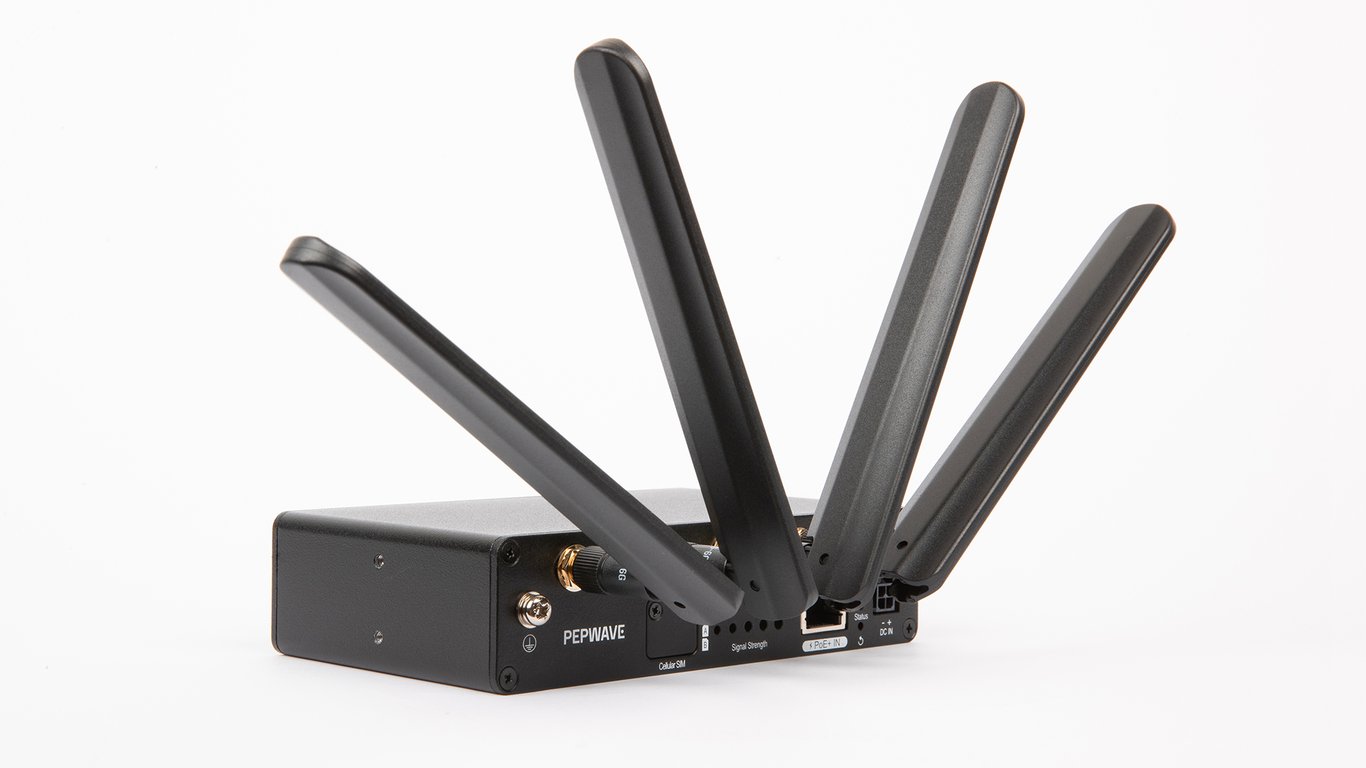
Peplink 5G Adapter with four external cellular antennas, original product perspective
5G / LTE

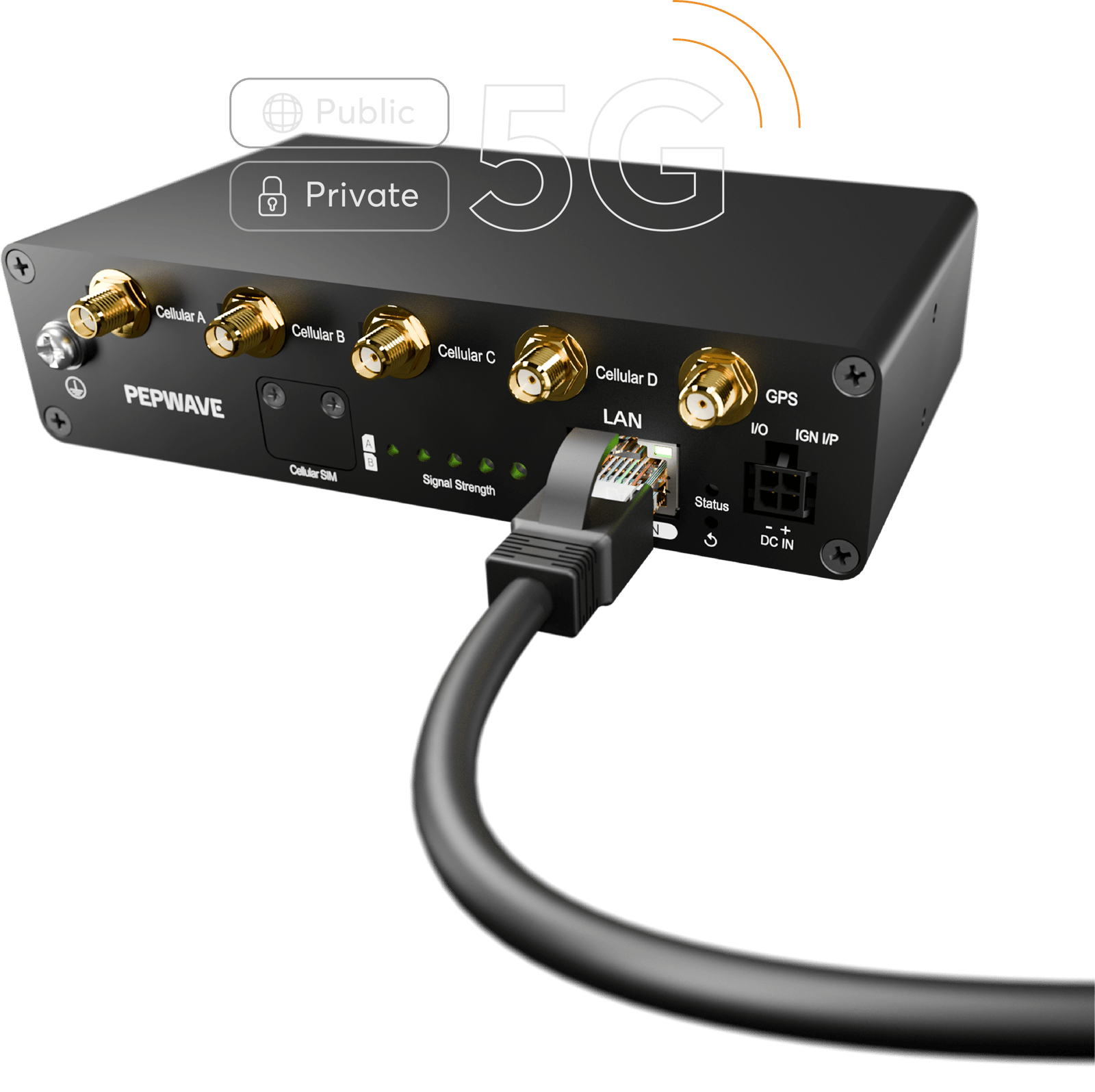
5G for public and private networks

One Sub-6-GHz 5G modem (SA/NSA) with LTE-CAT-19 fallback. Theoretical peak wireless speeds: 5G 3.4/0.55 Gbit/s; the Ethernet port is separately limited to 2.5 GbE. Check local network/tariff compatibility.

Check manufacturer specifications ↗
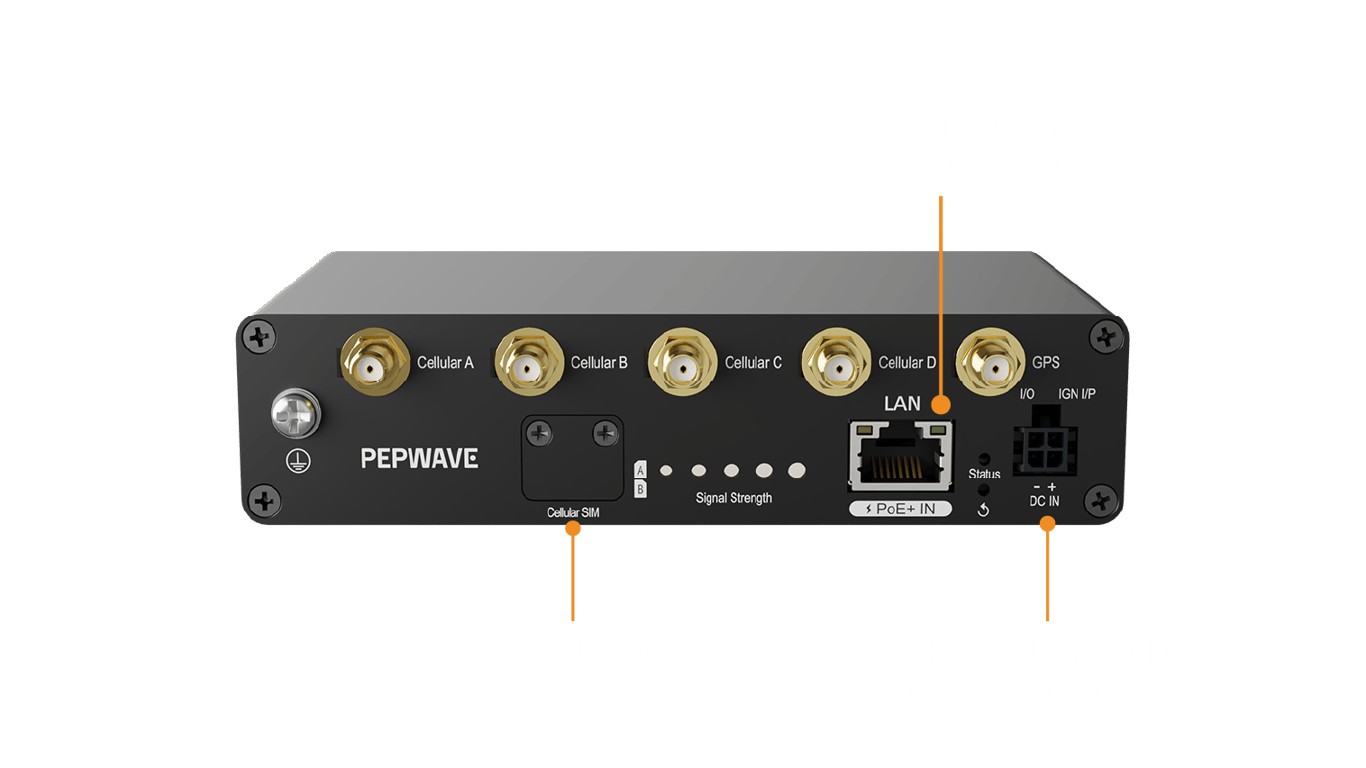
Peplink front-panel illustration: 2.5GbE with 802.3at PoE-In and Micro-Fit
ETHERNET / POWER

2.5 GbE and PoE input

One RJ45 port (10/100/1000/2500 Mbit/s) connects to the router or switch. 802.3at PoEinput or alternatively 10–30 V DC via a four-pin Micro-Fit; no PoE output.

Check manufacturer specifications ↗
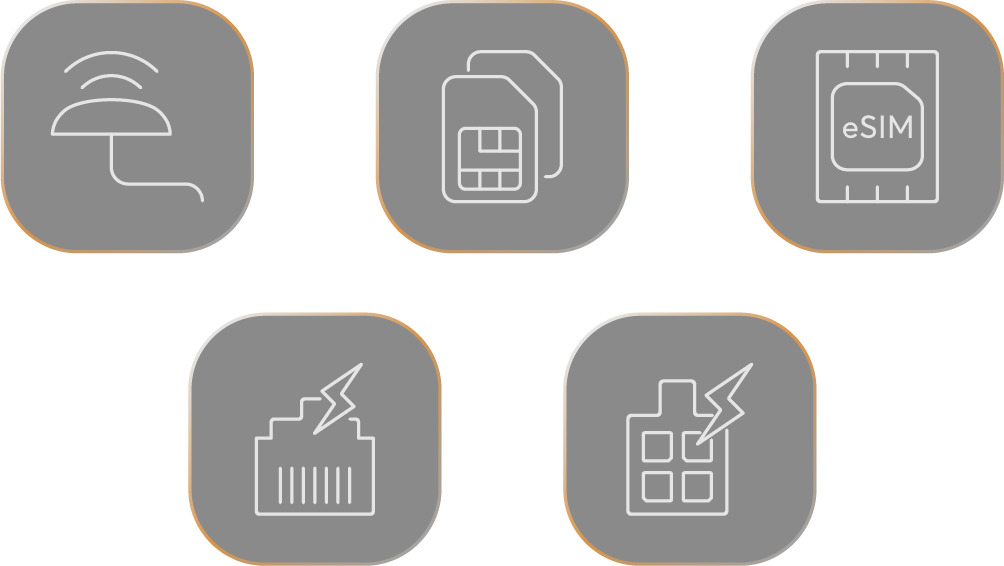
Original Peplink SIM icons: nano-SIM, eSIM and remote SIM
SIM / ESIM

Flexible SIM options

Two Nano-SIM slots for one built-in modem; Peplink eSIM, BYO eSIM (two profiles), RemoteSIM with SIM Injector and FusionSIM. Two SIM slots do not mean two simultaneous modems.

Check manufacturer specifications ↗
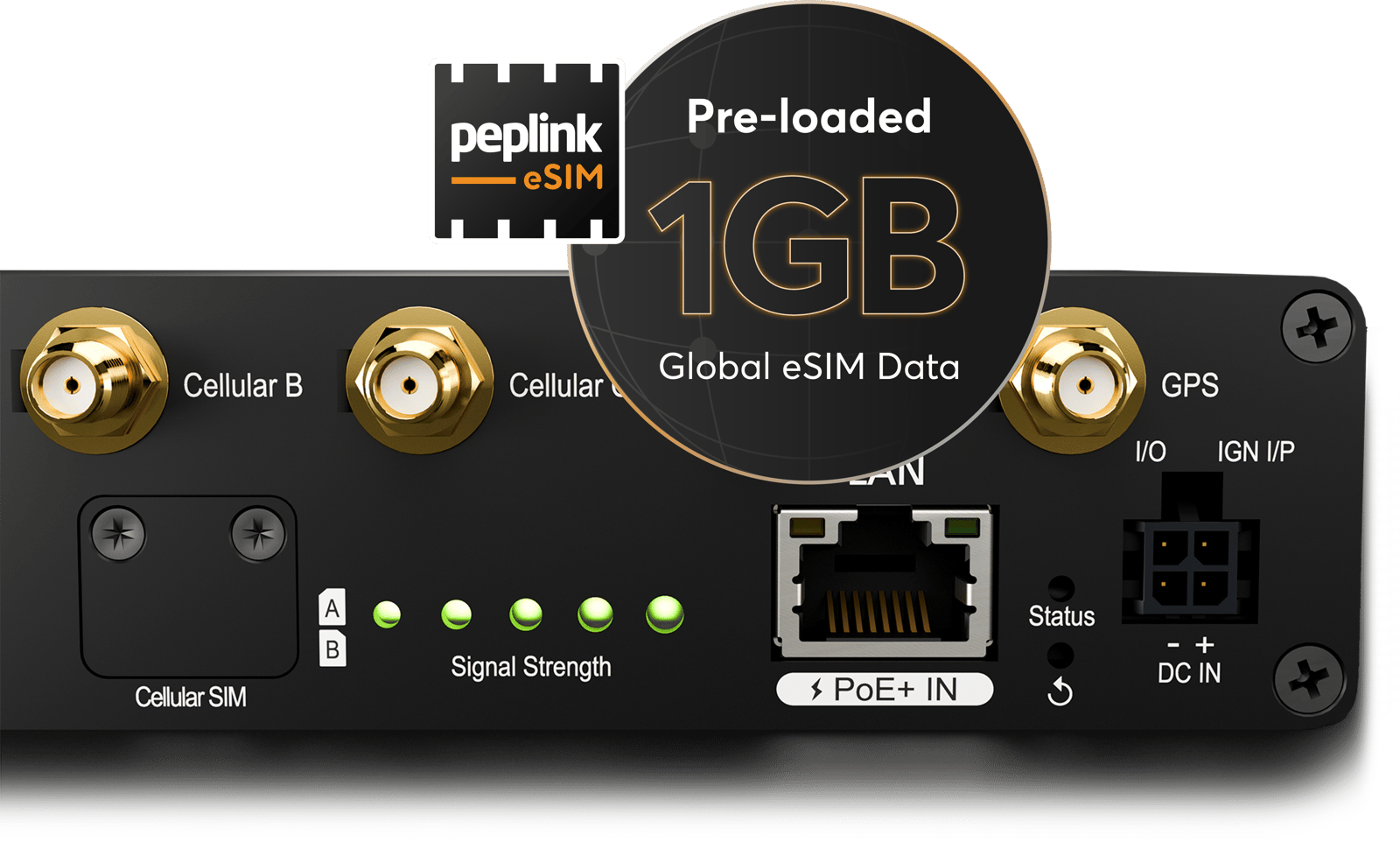
Original Peplink diagram: pre-loaded 1 GB global eSIM for provisioning
ZERO TOUCH

1 GB for initial activation

Peplink specifies 1 GB of pre-loaded global eSIM data for onboarding and eSIM profile downloads. Check supported countries and conditions before deployment; this is not an unlimited or automatically available German data plan.

Check manufacturer specifications ↗
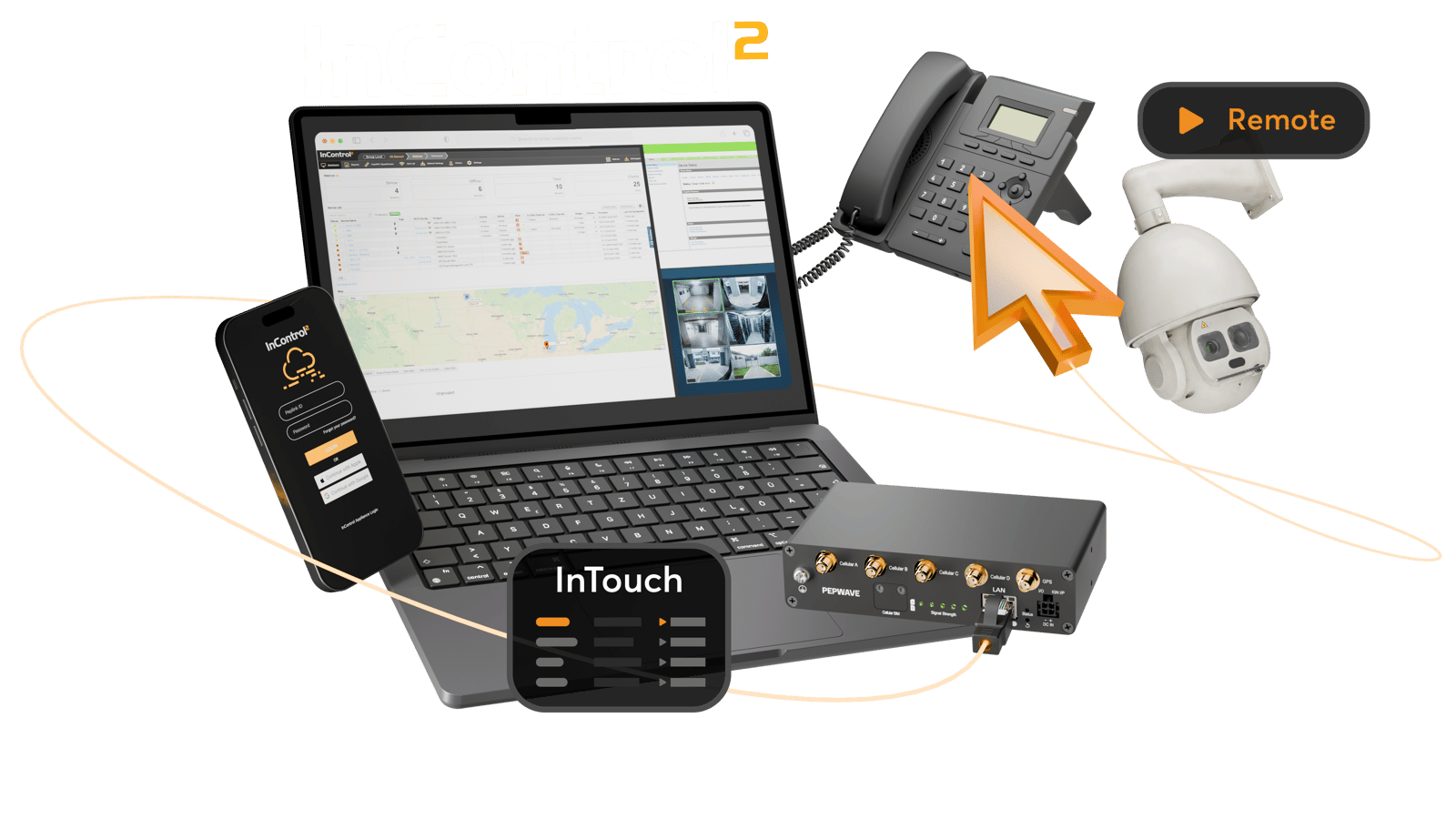
Original Peplink diagram: InControl 2 and InTouch for remote management
REMOTE

InControl and InTouch

InControl 2 supports device configuration and monitoring; InTouch provides remote and out-of-band access to connected devices. Continued InControl service requires valid PrimeCare coverage and a working connection.

Check manufacturer specifications ↗
Original Peplink icons: ignition sensing, GPS, signal and rugged operation
INDUSTRIAL USE

For fleets and IoT

Metal enclosure, GPS, ignition sensing, GPIO and a 0–5-bar signal indicator for vehicles, kiosks, cameras and sites. The datasheet specifies −40 to +65 °C; plan installation and power supply with appropriate expertise.

Check manufacturer specifications ↗

APPLICATION AND PRODUCT LIMITS

Integrate the adapter into a working architecture.

An additional cellular WAN path is only as reliable as its coverage, power supply, antennas and upstream router configuration.

EXISTING NETWORKS

Add a cellular Ethernet WAN

Via 2.5GbE, the adapter can provide a mobile network path to a compatible router or switch. IP Passthrough is possible according to the manufacturer's FAQ; a public IP address or reachability still depends on the tariff.

Plan your WAN architecture ↗
SEPARATE DEVICE ROLES

SpeedFusion is the router's role

The Peplink FAQ explicitly states that the 5G Adapter itself does not support SpeedFusion or SpeedFusion VPN. A suitable Peplink router can use its cellular connection as one WAN path.

Official FAQ ↗Peplink routers and multi-WAN advice ↗
FLEET / IOT

Plan power and antennas in advance

Micro-Fit with ignition input, PoE input, GPS and external LTE/5G antennas are useful for mobile installations. Check the power circuit, vehicle approval, SIM and management access.

Discuss installation ↗

ORIGINAL HARDWARE DIAGRAMS

Understand the ports and network path.

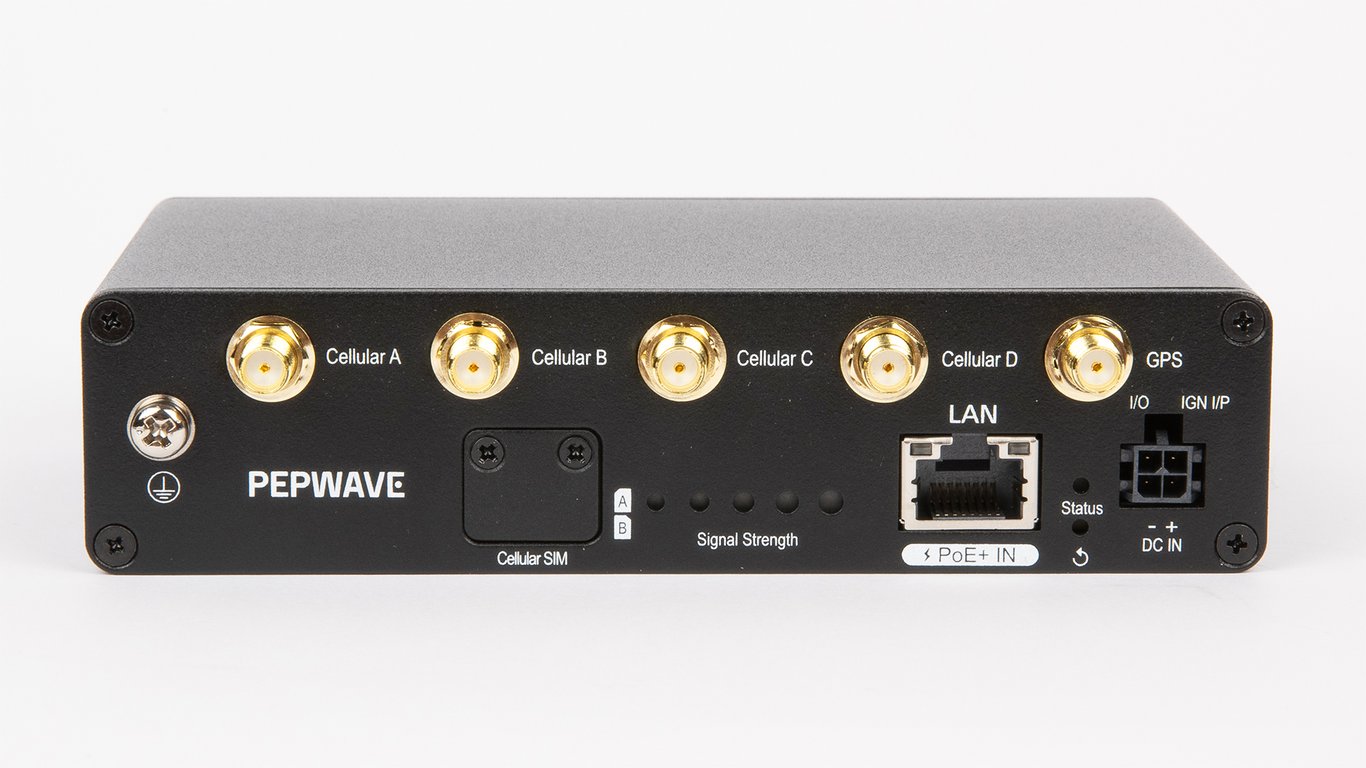
Peplink's front-panel diagram shows the PoE-input Ethernet port, two SIM slots, four cellular SMA connectors, GPS, status LED and Micro-Fit connector.

Peplink 5G Adapter front panel: four cellular SMA connectors, GPS, SIM A/B, RJ45 PoE input, Micro-Fit
CONNECTIONS

One port to connect to your network.

The single RJ45 port is 2.5-GbE LAN with 802.3at PoE input; it does not provide four LAN ports or a SpeedFusion router board. SIM A/B are two card slots for the single modem.

Micro-Fit (10–30 V DC) with GPIO and ignition sensing provides an alternative to the included 12 V power supply. PoE output is not specified.

Peplink 5G Adapter via RJ45 as a separate public or private 5G connection
NETWORK HANDOFF

Public and private 5G as a WAN source.

The adapter and router connect via Ethernet. The manufacturer mentions IP Passthrough; SIM addressing, NAT and router functionality are checked in the specific network design.

A Peplink router can integrate the adapter as an additional WAN input. Hot Failover, bonding and SpeedFusion are capabilities of an appropriate router and licensing architecture, not of the adapter itself.

FROM INITIAL CONNECTION TO OPERATION

Plan provisioning, SIM and remote access together.

The three manufacturer illustrations highlight what to check when rolling out multiple adapters. Data availability and ongoing services remain contract-dependent.

Original Peplink eSIM diagram for the initial 1 GB connection
ZERO-TOUCH PROVISIONING

Pre-loaded eSIM for setup.

According to Peplink, 1 GB of global eSIM data are available for the initial connection and downloading additional eSIM profiles. Countries, activation, usage and validity must be checked against the Peplink country list and the specific contract documents.

For ongoing operation, select a suitable nano-SIM, BYO eSIM or Peplink data option with a planned data allowance.

Peplink InControl 2 and InTouch remote-management illustration
MANAGEMENT

InControl 2 plus InTouch.

InControl 2 provides an overview and central configuration; the manufacturer's page adds InTouch for out-of-band access and remote troubleshooting on the connected device.

The FAQ states that one year of PrimeCare is included; continued use of InControl requires valid PrimeCare coverage . “Remote” requires an available connection and is not a guarantee against outages.

Peplink SIM icons showing two nano-SIM slots and eSIM
SIM PLANNING

One 5G modem, several SIM options.

The listed options are two physical nano-SIM slots, Peplink eSIM, BYO eSIM with two profiles, RemoteSIM via a SIM Injector and FusionSIM. Card and profile settings affect network selection; they do not create two integrated cellular links.

The ordering table lists ADP-5GZ-T-PRM for EMEA/APAC. Check supported bands and operator approval in Germany separately for each site and plan.

INDUSTRIAL AND MOBILE USE

Vehicles, field use and signal quality.

The Peplink diagrams show installation options; antenna routing, power supply and mechanical mounting are project decisions, not installation guarantees.

Peplink 5G Adapter: vehicle installation with external LTE/5G antennas and PoE input

Original Peplink illustration · Vehicle installation, antenna routing and power supply are project-specific.

Ignition sensing and GPIO

Ignition sensing and a four-pin Micro-Fit input for vehicle integration; alternatively, 802.3at PoE input. Plan wiring and circuit protection before installation.

GPS and signal indicator

Built-in GPS receiver with an active GPS antenna included; a 0–5-bar front LED indicator provides a quick reception check. The Peplink FAQ refers to the web admin interface for detailed readings.

External antennas

Four SMA cellular connections and one SMA GPS connection. Peplink lists Mobility and Slim antennas as compatible options – accessories, cables and mounting must be checked separately. Plan 5G/LTE antennas, cables and mounting.

Peplink manufacturer illustration: GPS tracking and front-panel LED in a 5G Adapter vehicle installation

Fleet GPS via InControl requires a suitable power supply, connection and valid service; tracking is not guaranteed in all circumstances.

MANUFACTURER SPECIFICATIONS · ADP-5GZ-T-PRM

Key specifications and limits.

Confirm the EMEA order code, frequency bands and power supply for the exact hardware/tariff combination before ordering. The 5G modem rate is not the guaranteed transfer rate at the 2.5-GbE output.

Peplink 5G Adapter EMEA specifications
Model / regionPeplink 5G Adapter ADP-5GZ-T-PRM · EMEA/APAC. The North American ADP-5GY-T-PRM has different band and certification specifications.
Mobile connectivityOne Sub-6-GHz 5G modem (NSA/SA), with LTE CAT-19 as fallback. Theoretical maximum rates: 5G 3.4 Gbit/s downlink / 550 Mbit/s uplink and LTE 1.6 Gbit/s / 200 Mbit/s; no real-world or end-to-end guarantee.
EMEA 5G bandsn1, n3, n5, n7, n8, n20, n28, n38, n40, n41, n71, n75, n76, n77, n78. The region is for reference only; check network and carrier compatibility separately.
EMEA LTE bandsB1, B3, B5, B7, B8, B20, B28, B32, B38, B40, B41, B42, B43, B71; match the plan and active bands at each site.
Ethernet / IP PassthroughOne RJ45 LAN port at 10/100/1000/2500 Mbit/s with 802.3at PoEinput. IP Passthrough is confirmed by the Peplink FAQ; the address passed through also depends on the cellular plan and network.
Power / datasheet discrepancy12 V / 2 A power supply included, or 10–30 V DC via four-pin Micro-Fit or PoE-In (802.3at). 6.5 W nominal; Datasheet: 10 W maximum; current FAQ: 12 W maximum. For power budgeting, clarify the discrepancy with Peplink for the exact version and allow sufficient headroom.
Nano-SIM / eSIMTwo nano-SIM slots for one 5G modem; Peplink eSIM, BYO eSIM (two profiles), RemoteSIM with a SIM Injector and FusionSIM. 1 GB Peplink global eSIM for initial provisioning, subject to country and product conditions.
Management / SpeedFusionInControl 2 and InTouch with a suitable connection and valid PrimeCare coverage; one year of PrimeCare according to the FAQ. The 5G Adapter itself supports neither SpeedFusion nor SpeedFusion VPN. If required, a compatible router handles this.
Enclosure / industrial useMetal housing, GPS, Ignition Sensing, GPIO and signal LED; four SMA Cellular, one SMA GPS. −40 to +65 °C; 138.2 × 80 × 33.5 mm, 390 g; 15–95 % relative humidity (non-condensing).
Package contentsOne 5G Adapter, a 12 V / 2 A four-pin power supply, four LTE/5G antennas ACW-235 and one active GPS antenna according to the Peplink datasheet/FAQ.
Service / accessoriesPrimeCare / PrimeCare+ Plan Z (PRM-Z / PCP-Z); separately listed DIN rail and ear-mount kits and Mobility/Slim antenna options are not automatically included.
No guaranteed site or network performance; specifications as stated in the Peplink datasheet and FAQ.Datasheet ↗

Primary sources: Peplink product page ↗ · Datasheet ↗ · Peplink FAQ ↗

FREQUENTLY ASKED QUESTIONS

What to clarify before deploying the 5G Adapter.

Is the 5G Adapter the same as the MAX Adapter 5G?

No. This product is the ADP-5GZ-T-PRM Ethernet adapter with 2.5-GbE RJ45 and PoE input. The older MAX Adapter 5G is a different USB-based product family.

Can two SIMs operate two 5G modems simultaneously?

No. Peplink specifies exactly one built-in 5G modem, two nano-SIM slots and eSIM options. A second cellular path that can be used simultaneously requires separate hardware.

Does the adapter itself support SpeedFusion or bonding?

No. The official Peplink FAQ confirms that the adapter itself does not support SpeedFusion or SpeedFusion VPN. A compatible Peplink router can use its Ethernet cellular connection as one WAN path in a separately licensed SpeedFusion architecture.

What does the pre-loaded 1 GB eSIM mean?

Peplink specifies 1 GB of global eSIM data for initial connection, setup and downloading additional eSIM profiles. Confirm supported countries, plan conditions and supplied features in advance; it is not an unlimited cellular contract.

Can the adapter pass the cellular IP address to a router?

According to the Peplink FAQ, the adapter supports IP Passthrough. Whether a public address is available depends on the specific cellular plan and the operator's CGNAT.

What power consumption should be budgeted?

The datasheet specifies 6.5 W nominal / 10 W maximum; the Peplink FAQ states 6.5 W nominal / 12 W maximum. Clarify this discrepancy between the manufacturer's sources for the specific device version before preparing a quote or PoE budget, and allow headroom.

Is InControl included indefinitely?

The Peplink FAQ lists one year of PrimeCare as included. Continued InControl management then requires valid PrimeCare coverage. InTouch depends on a working connection and appropriate access and security configuration.

How do I enquire about the EMEA version?

Request a quote and availability for ADP-5GZ-T-PRM. We clarify the region, SIM, antennas and integration before you order. Use the existing contact route for a consultation.

Sources for all technical answers: Peplink FAQ ↗ · Datasheet ↗

WIRELESSMAXX · ADVICE

The right model, not just a similar name.

We clarify network architecture, SKU, power, mounting and service before you order. PoE input powers the device; it does not mean PoE output or a separate LAN router.

Request a quote & integration ↗

Sources and next steps

Advice ↗Peplink model ↗Original datasheet ↗
  • Solutions
  • Knowledge Centre
  • eStore

Copyright © 2002 - 2026 wirelessmaxx

  • Imprint
  • Terms and Conditions