Skip to content
No results
  • Internetlösungen
    • Mein Unternehmensstandort
    • Meine mobilen Teams
    • Mein temporärer Einsatz
    • My backup connection
    • GO-Anschlussvarianten
  • Technologien
    • Starlink – Tarif & Service
    • Starlink-Terminals
    • Peplink – Router & Multi-WAN
    • Peplink MAX series
    • Hardware & Zubehör
  • Referenzen
    • Case Studies
    • WIFIROCKSTARS
    • Veranstaltungsorte
  • Wissen
    • Knowledge Centre
    • Technology, blog & news
  • Über uns
  • eStore
Contact us

PEPLINK · BRIEFLY EXPLAINED

What does SpeedFusion do?

SpeedFusion uses several suitable internet connections within a shared VPN tunnel. The three functions serve different purposes:

Bandwidth Bonding – use the bandwidth of multiple WAN connections for a shared data stream.

WAN Smoothing – send redundant packets to reduce the effects of packet loss and jitter. This requires additional bandwidth.

Hot Failover – preserve ongoing sessions through the remaining tunnel paths when a connection fails.

This requires compatible routers, a reachable endpoint, suitable WAN connections and the required features or licences. Uninterrupted availability is not guaranteed.


Read the full explanation

Kontaktieren Sie WirelessMaxx

Erzählen Sie uns von Ihrem Vorhaben. Wir unterstützen Sie bei der Auswahl und Planung Ihrer Business-Konnektivität.
  • Internetlösungen
    • connecting.works GO

      Ihr Anschluss. Als Lösung.

      Sie sagen uns, was funktionieren muss. Wir klären die passende Verbindung.

      Internetlösungen entdecken
      Für Ihren EinsatzMein UnternehmensstandortMeine mobilen TeamsMein temporärer EinsatzMein bestehender Anschluss

      Technik müssen Sie nicht auswählen.

      Wir beginnen mit Ihrem Bedarf – nicht mit Routermodellen.

      Anschluss besprechen
  • Technologien
    • Tarif & Service

      Starlink

      Business & EinsatzbereicheTerminals im ÜberblickTarif- & PaketberatungStarlink mieten
      Router & Multi-WAN

      Peplink

      Router & Produktfamilien5G-Adapter & AntennenBonding & AusfallsicherheitHardware & Zubehör im eStore
      Lieber eine komplette Anschlusslösung?connecting.works GO entdecken
  • Referenzen
    • Erfahrung aus Projekten

      Was Verbindungen möglich machen.

      Nachvollziehbare Projekte statt abstrakter Produktversprechen.

      Projekte & Events

      Case StudiesWIFIROCKSTARSVeranstaltungsorte
      Projektbeispiel

      FIA Kart-WM Wackersdorf

      Ein Einblick in die technische Konnektivität vor Ort.

      Originalbericht ansehen
  • Wissen
    • Wissen statt Fachchinesisch

      Verbindungen verstehen.

      Grundlagen in Ruhe erklären. Das vollständige Glossar bleibt im Wissenscenter.

      Wissenscenter öffnen

      Frequently asked questions

      Starlink Business vs. StandardFailover oder Bonding?SpeedFusion verständlich erklärt

      WIFIROCKSTARS Blog & News

      Einordnung und praktische Erfahrungen aus dem Netzwerkalltag.

      Beiträge ansehen
  • Über uns
  • eStore
  • German
Contact us

PEPLINK · MODEL ADVICE

Peplink Balance 310 5G HW3Fixed-site HW3 chassis with built-in 5G.

Balance 310 5G HW3 is neither the wired Peplink Balance 310 nor the older 310-5G hardware in the shop. Eight 2.5GbE LAN ports, PoE+ and Wi-Fi 7 are exclusive to the HW3 model described here.

Discuss your project ↗

Please enquire about a quotation and availability for this exact HW3 model through our advisory team. Direct online purchase of this version is not currently confirmed.

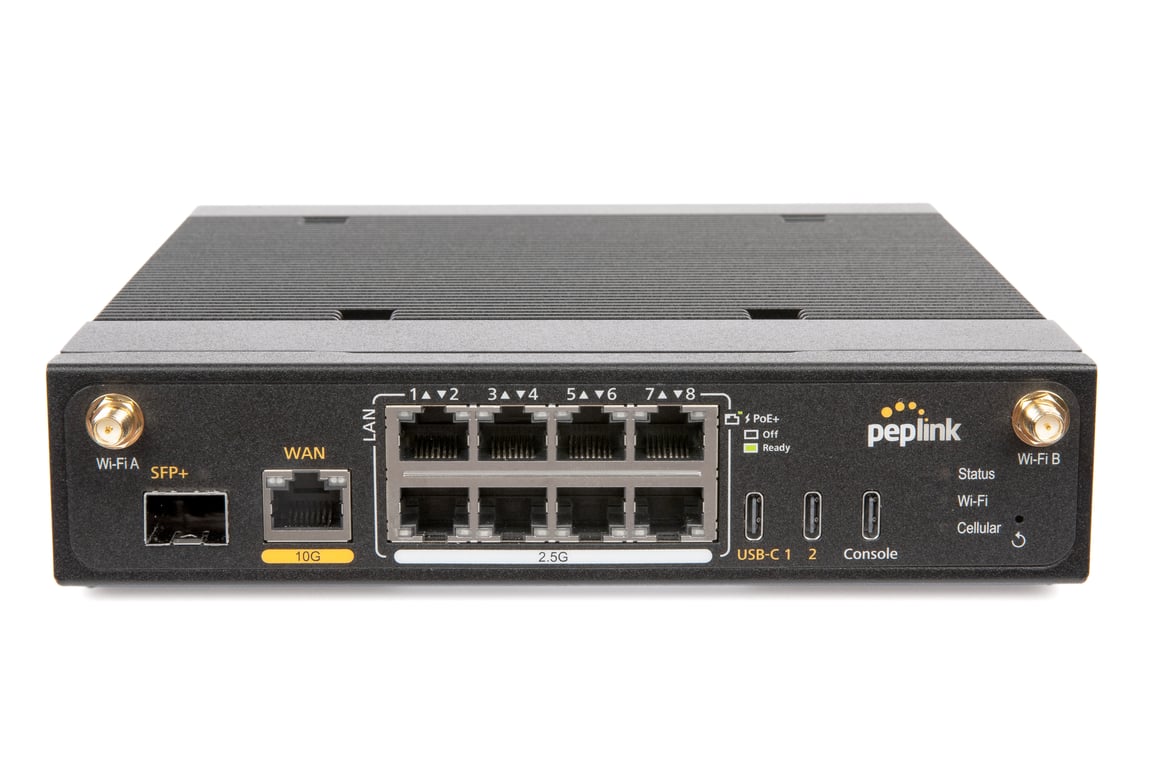
Peplink manufacturer device: Peplink Balance 310 5G HW3
Original Peplink device image · Peplink Balance 310 5G HW3
1 × 5GModel feature
8 × 2.5GbE LANTechnology
240 W PoE budgetDecision boundary

Manufacturer code: BPL-310-5GK-T-PRM. All throughput and wireless figures are laboratory/manufacturer specifications, not a guarantee in network operation.

FeaturesHW3 features5G expansionPoE+ / EdgeApplicationsHardwareSpecificationsQuestions

ORIGINAL PEPLINK GRAPHICS

What matters for this model.

Balance 310 5G HW3 is neither the wired Balance 310 nor the older 310-5G hardware in the shop. Eight 2.5GbE LAN ports, PoE+ and Wi-Fi 7 are exclusive to the HW3 model described here.

Peplink image: Peplink Balance 310 5G HW3
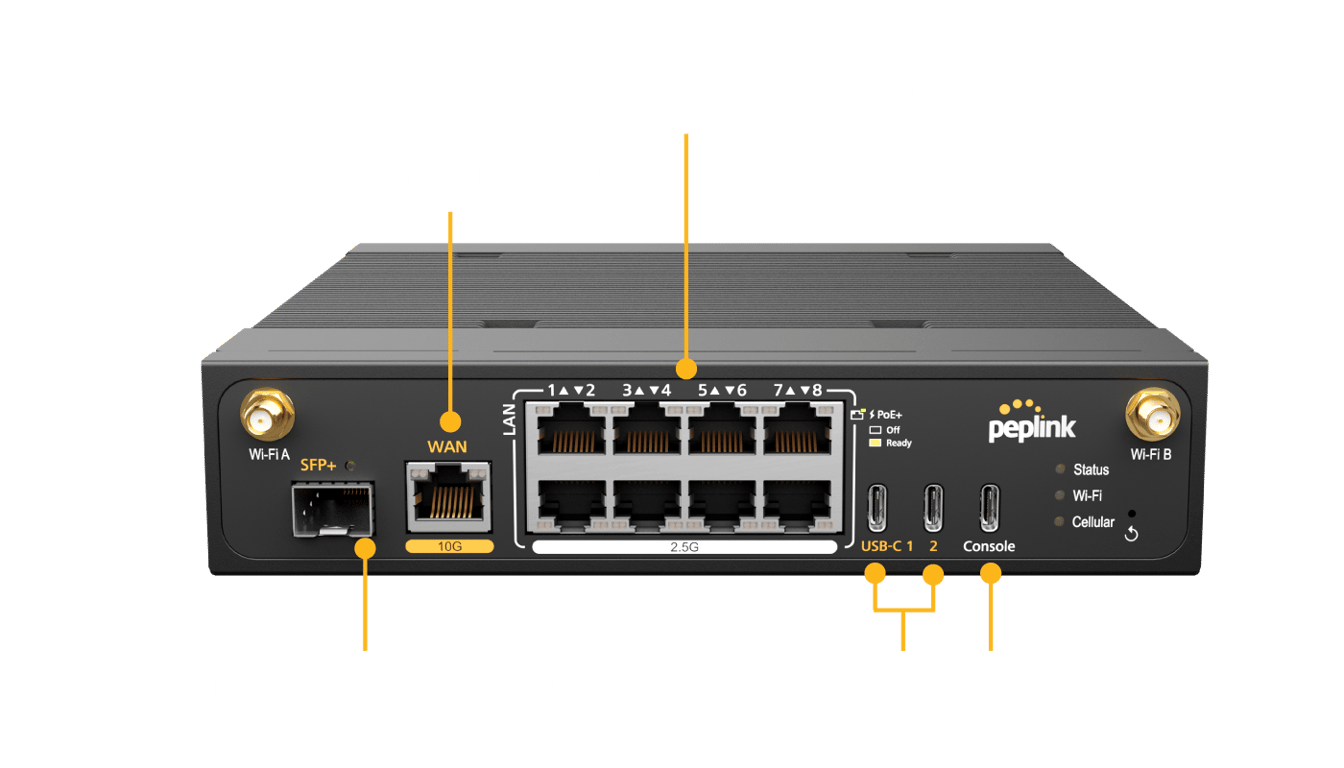
HW3-WAN/LAN

HW3-WAN/LAN

HW3: 1x 10G Multi-Gig Ethernet WAN, 1x 10G SFP+ WAN/LAN (configurable via Web Admin), 2x USB-C WAN, 8x 2.5G Ethernet LAN with 802.3at PoE+.

Check the datasheet ↗
Peplink image: Peplink Balance 310 5G HW3
PoE power supply

PoE power supply

HW3 PoE limit: up to 8x 802.3at PoE+, with a total budget of 240 W; 50–54 V DC input is required to enable PoE output. Do not confuse this with the separately identified 8 PoE 10G Switch.

Check the datasheet ↗
240 W PoE budget
5G / SIM

5G / SIM

HW3: 1 integrated 5G modem with redundant SIM slots; theoretical mobile data rate: 5G 4.1 Gbit/s down/900 Mbit/s up, CAT-20 2/0.211 Gbit/s. SIM: Nano-SIM, Peplink eSIM/BYO-eSIM, Remote SIM/SIM Injector/FusionSIM. Number of BYO-eSIM profiles: the current datasheet specifies 4, the official FAQ 2 profiles; clarify for the specific hardware and firmware before ordering.

Check the datasheet ↗

SIX OFFICIAL PEPLINK HW3 FEATURES

More than a 5G failover router.

10G, built-in 5G, Wi-Fi 7, eight PoE+ LAN ports, SpeedFusion and Docker are combined in the HW3 described here — but not in the older 310 5G hardware or the wired Balance 310.

Official Peplink HW3 icon: Gigabit SpeedFusion
Balance 310 5G · HW3

Gigabit SpeedFusion

1 Gbit/s VPN throughput according to the HW3 datasheet, including with 256-bit AES. Bonding, Hot Failover and Smoothing require suitable remote endpoints, connections and licence/PrimeCare configuration.

Official Peplink HW3 icon: 10G Ethernet & fibre
Balance 310 5G · HW3

10G Ethernet & Fibre

One 10G Multi-Gig Ethernet WAN and one 10G SFP+ port configurable as WAN/LAN. Check the port mode and required transceivers for your project.

Official Peplink HW3 icon: 8 × PoE+ · 240 W total
Balance 310 5G · HW3

8 × PoE+ · 240 W total

Eight 2.5GbE LAN ports with 802.3at PoE+ and a maximum total budget of 240 W. PoE output is only enabled at 50–54 V DC.

Official Peplink HW3 icon: Wi-Fi 7 for the local network
Balance 310 5G · HW3

Wi-Fi 7 for the local network

Dual-band Wi-Fi 7 with 2×2 MIMO. Wi-Fi can be used as an AP or Wi-Fi WAN; this does not imply guaranteed net data rates or country approvals.

Official Peplink HW3 icon: One built-in 5G modem
Balance 310 5G · HW3

One built-in 5G modem

HW3 includes a 5G Sub-6 modem with redundant Nano-SIM slots, Peplink/BYO eSIM and RemoteSIM options; check the German carrier/tariff profile individually.

Official Peplink HW3 icon: Docker & 8 GB storage
Balance 310 5G · HW3

Docker & 8 GB Storage

Native Docker support with 8 GB of internal storage for suitable edge applications. Plan resource requirements, security and the required images beforehand.

BUILT-IN 5G + OPTIONAL ADDITIONAL SOURCES

Expand 5G with additional devices.

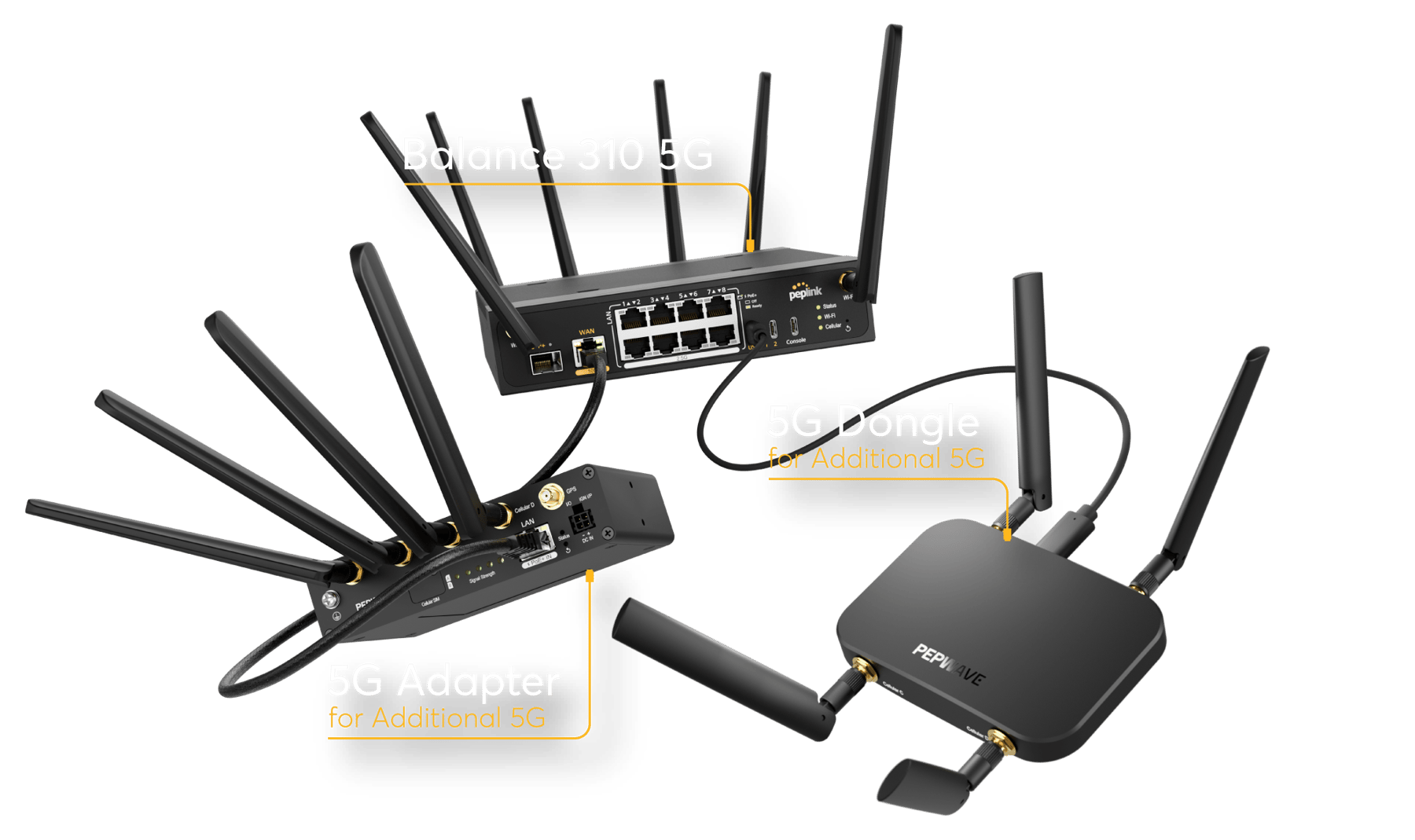
The built-in modem provides one cellular path. For further independent 5G connections, Peplink shows the separately available 5G Adapter and 5G Dongle.

Peplink Balance 310 5G with separately available 5G Adapter and 5G Dongle
Original Peplink graphic · Balance 310 5G HW3

Plan additional 5G devices separately

The separate Peplink 5G Adapter with an Ethernet connection is a separate model (ADP-5GZ-T-PRM for EMEA), not a second internal modem. Check dongle compatibility, USB port allocation, firmware, SIMs, mobile tariffs and power supply in advance. The graphic illustrates the architecture, not the scope of delivery.

FIBRE · WI-FI WAN · 5G · FWA · SATELLITE

Combine suitable WAN sources.

Peplink illustrates fibre, built-in 5G, Wi-Fi WAN, FWA, and LEO and GEO satellites as possible WAN sources beyond the built-in wired ports.

Peplink graphic: fibre, FWA, 5G and satellite WAN for SpeedFusion
Original Peplink graphic · Balance 310 5G HW3

Coordinate SpeedFusion and connection planning

SpeedFusion can use Bandwidth Bonding, Hot Failover or Smoothing with suitably reachable endpoints and services. The lines in the diagram do not represent guaranteed simultaneous connection capacity. A Starlink terminal is separate and available from wirelessmaxx only with a tariff/service package. To plan the actual internet connections, Connection advice with connecting.works GO guides you towards the appropriate next step.

SUITABLE REMOTE ENDPOINT AND MULTIPLE ACTUAL LINKS

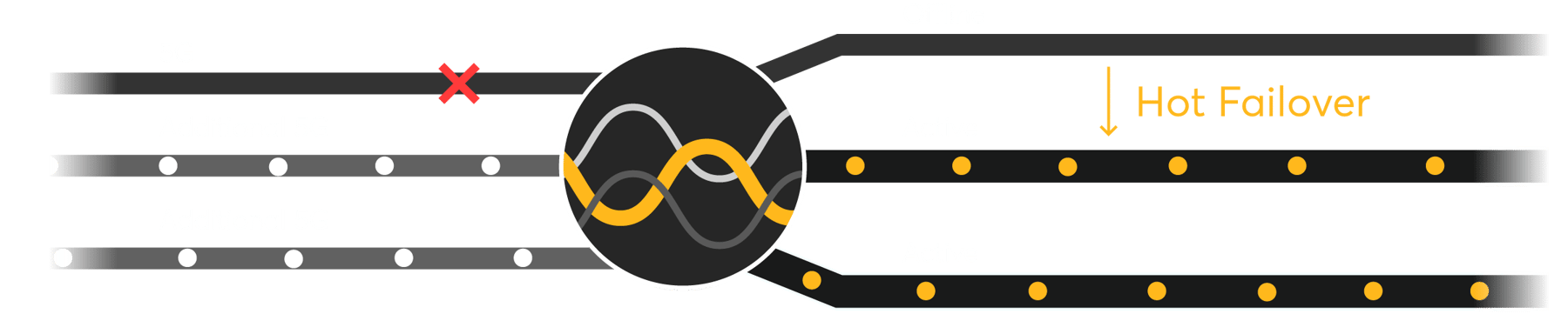
Hot Failover: reduced interruption under suitable conditions.

The manufacturer's image shows a failed 5G path and additional active cellular sources.

Peplink Hot Failover diagram with an additional 5G path
Original Peplink graphic · Balance 310 5G HW3

Check remaining connections and the remote endpoint

Whether existing sessions actually continue depends on the selected SpeedFusion mode, PrimeCare/remote endpoint, SIM/plan configuration and actual wireless coverage. At least one suitable WAN path, the remote endpoint and power must remain available. There is no blanket zero-downtime guarantee.

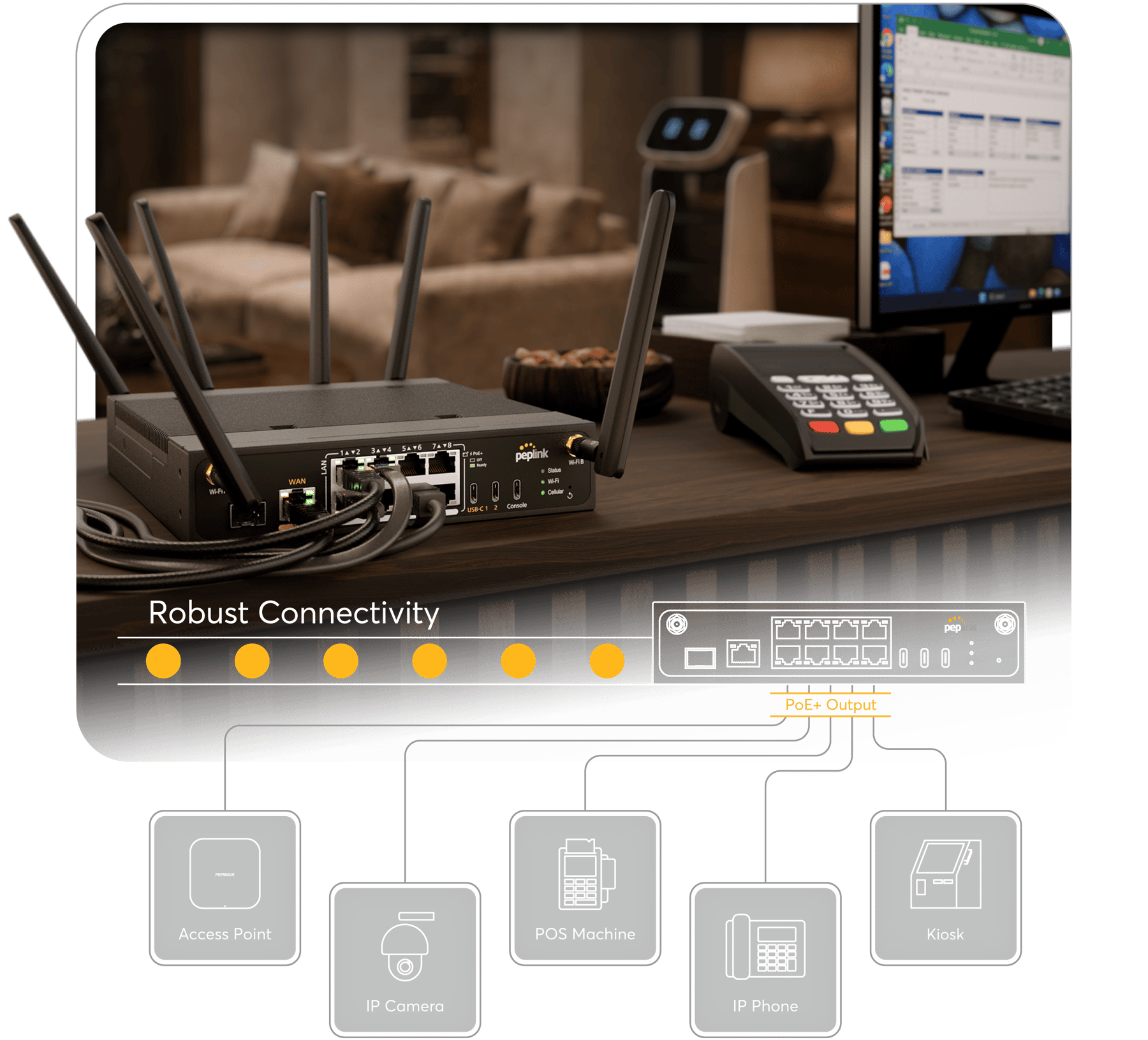
8 × 2.5GBE LAN · 802.3AT

Power PoE+ peripherals from the router.

Cameras, access points, IP phones and other compatible devices can be connected to the eight LAN ports.

Peplink branch graphic with Balance 310 5G and PoE+ peripherals
Original Peplink graphic · Balance 310 5G HW3

Check the PoE budget and input voltage

The 802.3at power class applies per port, with a maximum of 240 W across all ports. PoE output requires 50–54 V DC at the router input. Refer to the 54 V power supply listed in the datasheet; calculate each device's power demand for the project.

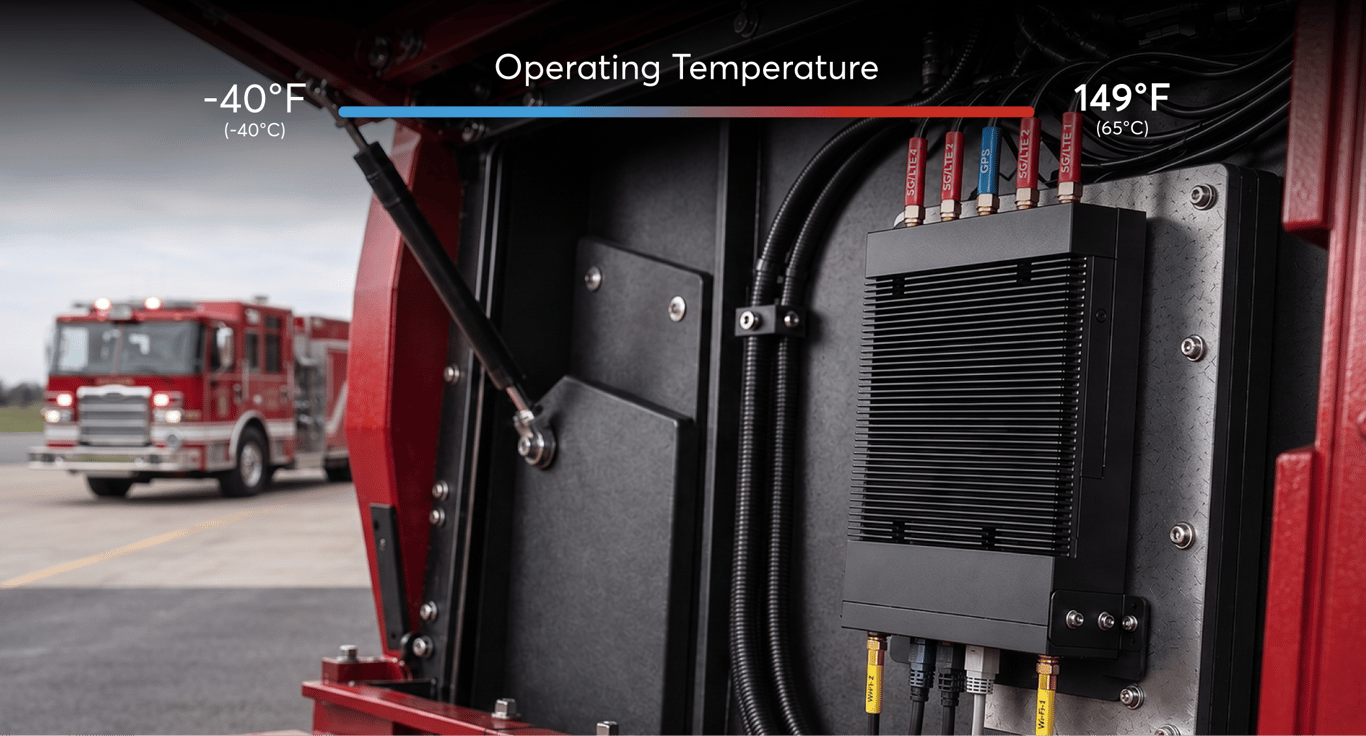
INDUSTRIAL-GRADE CHASSIS

Fanless, with GPS and dual power paths.

The HW3 chassis is fanless and specified for −40 to +65 °C in the datasheet; a GPS antenna is listed in the package contents.

Peplink Balance 310 5G in a rugged vehicle/industrial environment
Original Peplink graphic · Balance 310 5G HW3

Plan power and installation

Two 54 V DC power DIN connectors and a 12–54 V terminal block offer power supply options, but do not replace project-specific redundancy planning. PoE outputs still require 50–54 V. Check the installation location and humidity.

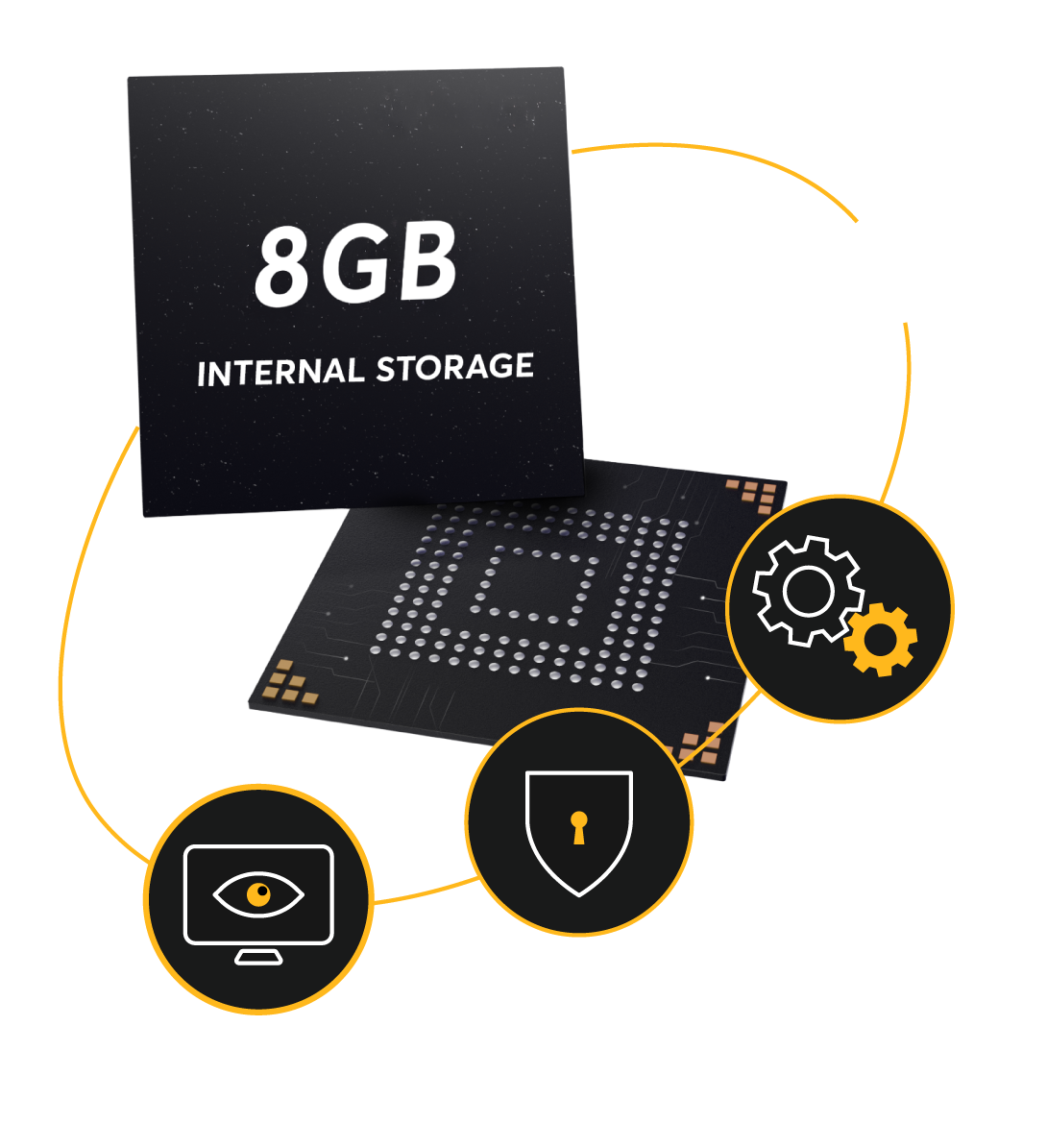
DOCKER · 8 GB INTERNAL STORAGE

Edge services directly on site.

Docker and 8 GB of internal storage are provided on the current Balance 310 5G HW3.

Peplink edge computing graphic with Docker and 8 GB of internal storage
Original Peplink graphic · Balance 310 5G HW3

Check resources and software maintenance beforehand

Suitable monitoring, automation or security containers can run on site. Before production use, check CPU/RAM, software maintenance, storage requirements, security rules and external USB storage options separately; Docker is not an automatically included managed service.

ARCHITECTURE, NOT UNVERIFIED PERFORMANCE PROMISES

Use in the right system.

Size the site gateway with its 10G uplink, built-in 5G and planned PoE power path.

PLANNING

Networks and location

Size the site gateway with its 10G uplink, built-in 5G and planned PoE power path. Power and installation depend on the actual deployment location.

Project discussion ↗
MODEL DISTINCTIONS

These are not interchangeable

No direct purchase path to the older BPL-310-5GD-D-T-PRM shop item; confirm the HW3 SKU before a quotation.

Manufacturer product page ↗
ORDER VARIANT

Check SKU and service

Before purchase, confirm in writing that the manufacturer's SKU, hardware revision, licences and included items match the specific quotation.

More on planning ↗

MANUFACTURER IMAGE · Peplink Balance 310 5G HW3

Connections, installation and model limitations.

The original graphic is an illustration. The exact order code and the official datasheet are authoritative.

Official Peplink hardware graphic: Peplink Balance 310 5G HW3
BPL-310-5GK-T-PRM

Match hardware correctly.

Size the site gateway with its 10G uplink, built-in 5G and planned PoE power path.

No direct purchase path to the older BPL-310-5GD-D-T-PRM shop item; confirm the HW3 SKU before a quotation.

MANUFACTURER SPECIFICATIONS · Peplink Balance 310 5G HW3

Key technical specifications.

Reference: BPL-310-5GK-T-PRM. The manufacturer's figures do not automatically apply to other variants, hardware generations or plans.

Technical specifications: Peplink Balance 310 5G HW3
Model and hardwarePeplink Balance 310 5G HW3
Peplink order codeBPL-310-5GK-T-PRM
HW3-WAN/LANHW3: 1x 10G Multi-Gig Ethernet WAN, 1x 10G SFP+ WAN/LAN (configurable via Web Admin), 2x USB-C WAN, 8x 2.5G Ethernet LAN with 802.3at PoE+.
PoE power supplyHW3 PoE limit: up to 8x 802.3at PoE+, with a total budget of 240 W; 50–54 V DC input is required to enable PoE output. Do not confuse this with the separately identified 8 PoE 10G Switch.
Routing / Wi-FiHW3: router throughput 4 Gbit/s; VPN 1 Gbit/s without encryption and 1 Gbit/s with 256-bit AES; Wi-Fi 7 dual-band 2×2 MIMO; Docker with 8 GB internal storage.
5G / SIMHW3: 1 integrated 5G modem with redundant SIM slots; theoretical mobile data rate: 5G 4.1 Gbit/s down/900 Mbit/s up, CAT-20 2/0.211 Gbit/s. SIM: Nano-SIM, Peplink eSIM/BYO-eSIM, Remote SIM/SIM Injector/FusionSIM. Number of BYO-eSIM profiles: the current datasheet specifies 4, the official FAQ 2 profiles; clarify for the specific hardware and firmware before ordering.
AntennasHW3: antenna connectors 4x SMA cellular, 2x RP-SMA Wi-Fi, 1x SMA GPS; package includes 4x LTE/5G, 2x Wi-Fi and 1x GPS antenna. Official add-ons: ANT-MB-42G-S-B-6 and ANT-MB-42G-S-W-6.
Power / temperatureHW3: 27 W nominal/54 W max. without PoE and USB-C, 12–54 V DC terminal block or 2x 54-V-DIN/54-V adapters; -40 to 65 °C; 186 x 205 x 41 mm; 1.55 kg; 1 year limited warranty.
PrimeCareHW3 firmware/PrimeCare limits: 2 SpeedFusion VPN peers by default, 30 with PrimeCare (first year complimentary), 50 via SFN-LC-50; AP/switch controller: standard maximum 30/50 with AP-LC-50. The datasheet does not specify a blanket minimum firmware version for the base hardware; eSIM/Remote SIM specifications for HW1–2 are documented from firmware 8.4.0.
Manufacturer specifications, not guaranteed performance at the site.Peplink datasheet ↗

Official primary sources: Peplink product page ↗ · Peplink datasheet ↗

QUESTIONS BEFORE PURCHASE

Frequently asked questions about the Peplink Balance 310 5G HW3.

Which model code and generation apply?

Peplink Balance 310 5G HW3: BPL-310-5GK-T-PRM. No direct purchase path to the older BPL-310-5GD-D-T-PRM shop item; confirm the HW3 SKU before a quotation.

Are wireless, port and performance specifications guaranteed real-world figures?

No. Manufacturer specifications depend on the model and, in some cases, the configuration. The datasheet, specific hardware version, frequency/network availability and power supply take precedence.

Can I buy this exact version directly?

Please enquire about a quotation and availability for this exact HW3 model through our advisory team. Direct online purchase of this version is not currently confirmed.

WIRELESSMAXX · ADVICE

The right model, not just a similar name.

We clarify network architecture, SKU, power, mounting and service before ordering. No direct purchase path to the older BPL-310-5GD-D-T-PRM shop item; confirm the HW3 SKU before a quotation.

Request a quote & integration ↗

Sources and next steps

Advice ↗Peplink model ↗Original datasheet ↗
  • Solutions
  • Knowledge Centre
  • eStore

Copyright © 2002 - 2026 wirelessmaxx

  • Imprint
  • Terms and Conditions