Skip to content
No results
  • Internetlösungen
    • Mein Unternehmensstandort
    • Meine mobilen Teams
    • Mein temporärer Einsatz
    • My backup connection
    • GO-Anschlussvarianten
  • Technologien
    • Starlink – Tarif & Service
    • Starlink-Terminals
    • Peplink – Router & Multi-WAN
    • Peplink MAX series
    • Hardware & Zubehör
  • Referenzen
    • Case Studies
    • WIFIROCKSTARS
    • Veranstaltungsorte
  • Wissen
    • Knowledge Centre
    • Technology, blog & news
  • Über uns
  • eStore
Contact us

PEPLINK · BRIEFLY EXPLAINED

What does SpeedFusion do?

SpeedFusion uses several suitable internet connections within a shared VPN tunnel. The three functions serve different purposes:

Bandwidth Bonding – use the bandwidth of multiple WAN connections for a shared data stream.

WAN Smoothing – send redundant packets to reduce the effects of packet loss and jitter. This requires additional bandwidth.

Hot Failover – preserve ongoing sessions through the remaining tunnel paths when a connection fails.

This requires compatible routers, a reachable endpoint, suitable WAN connections and the required features or licences. Uninterrupted availability is not guaranteed.


Read the full explanation

Kontaktieren Sie WirelessMaxx

Erzählen Sie uns von Ihrem Vorhaben. Wir unterstützen Sie bei der Auswahl und Planung Ihrer Business-Konnektivität.
  • Internetlösungen
    • connecting.works GO

      Ihr Anschluss. Als Lösung.

      Sie sagen uns, was funktionieren muss. Wir klären die passende Verbindung.

      Internetlösungen entdecken
      Für Ihren EinsatzMein UnternehmensstandortMeine mobilen TeamsMein temporärer EinsatzMein bestehender Anschluss

      Technik müssen Sie nicht auswählen.

      Wir beginnen mit Ihrem Bedarf – nicht mit Routermodellen.

      Anschluss besprechen
  • Technologien
    • Tarif & Service

      Starlink

      Business & EinsatzbereicheTerminals im ÜberblickTarif- & PaketberatungStarlink mieten
      Router & Multi-WAN

      Peplink

      Router & Produktfamilien5G-Adapter & AntennenBonding & AusfallsicherheitHardware & Zubehör im eStore
      Lieber eine komplette Anschlusslösung?connecting.works GO entdecken
  • Referenzen
    • Erfahrung aus Projekten

      Was Verbindungen möglich machen.

      Nachvollziehbare Projekte statt abstrakter Produktversprechen.

      Projekte & Events

      Case StudiesWIFIROCKSTARSVeranstaltungsorte
      Projektbeispiel

      FIA Kart-WM Wackersdorf

      Ein Einblick in die technische Konnektivität vor Ort.

      Originalbericht ansehen
  • Wissen
    • Wissen statt Fachchinesisch

      Verbindungen verstehen.

      Grundlagen in Ruhe erklären. Das vollständige Glossar bleibt im Wissenscenter.

      Wissenscenter öffnen

      Frequently asked questions

      Starlink Business vs. StandardFailover oder Bonding?SpeedFusion verständlich erklärt

      WIFIROCKSTARS Blog & News

      Einordnung und praktische Erfahrungen aus dem Netzwerkalltag.

      Beiträge ansehen
  • Über uns
  • eStore
  • German
Contact us

PEPLINK · DUAL-MODEM ENCLOSURE

Peplink Antenna MAX DuoKeeping two router paths together.

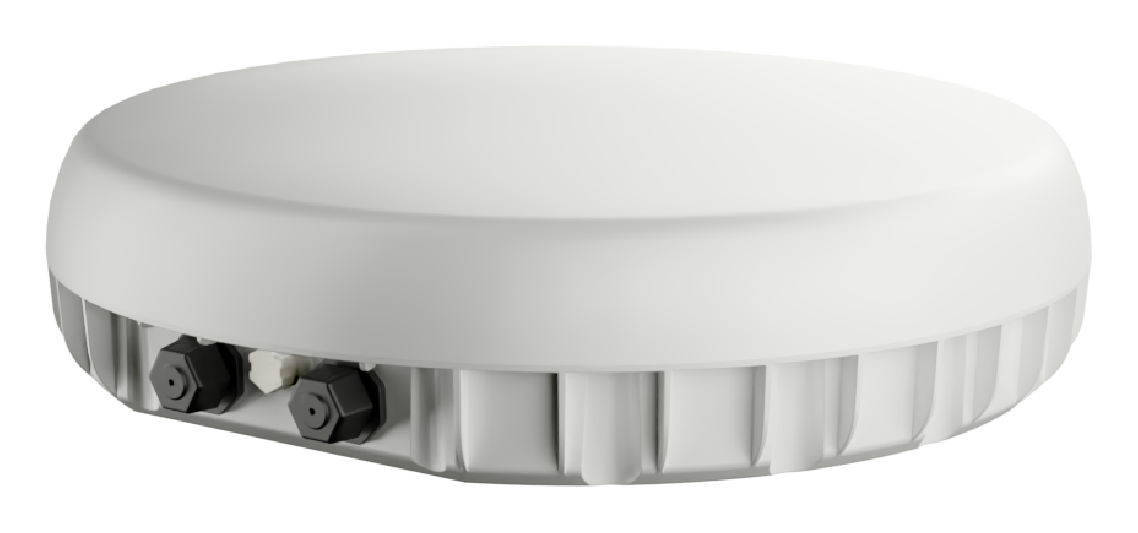
Antenna MAX Duo combines eight 5G/LTE, two Wi-Fi and one GPS antenna element with an outdoor enclosure for suitable dual-modem or dual-router setups. Modems and routers are not built into the enclosure.

Discuss your project ↗View Antenna MAX Duo in the shop ↗

WordPress: advice and integration · Shopify: price, specific order variant and delivery terms. Shop currently on wirelessmaxx.de.

Official Peplink product image: Peplink Antenna MAX Duo
Peplink manufacturer image · Peplink Antenna MAX Duo
8 + 2 + 1Cellular · Wi-Fi · GPS
2 routersoptional, not included
IP67enclosure rating stated by Peplink

When more than one router is used, Peplink requires a Splitter MAX for the single-cable power path.

FeaturesApplicationsHardwareSpecificationsQuestions

ORIGINAL PEPLINK GRAPHICS

What defines this model.

The antenna does not guarantee bandwidth. Performance and redundancy depend on the router, modems, service plans and network architecture.

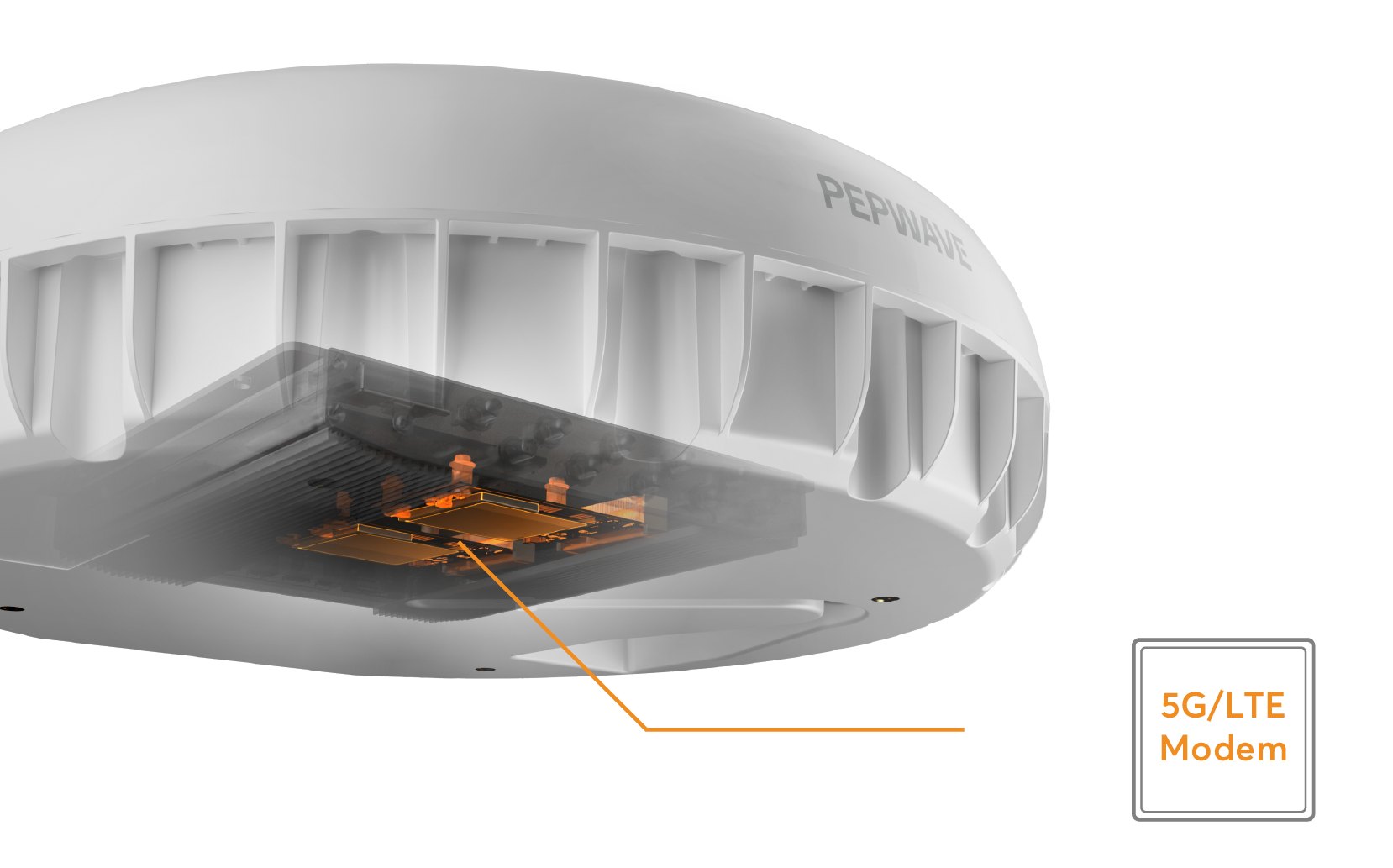
Peplink manufacturer image: dual-modem architecture
INSTALLATION

Dual-modem architecture

A compatible BR2 Pro or a suitable dual-router combination is planned for installation in the enclosure; these routers are not automatically included.

Details in context ↗
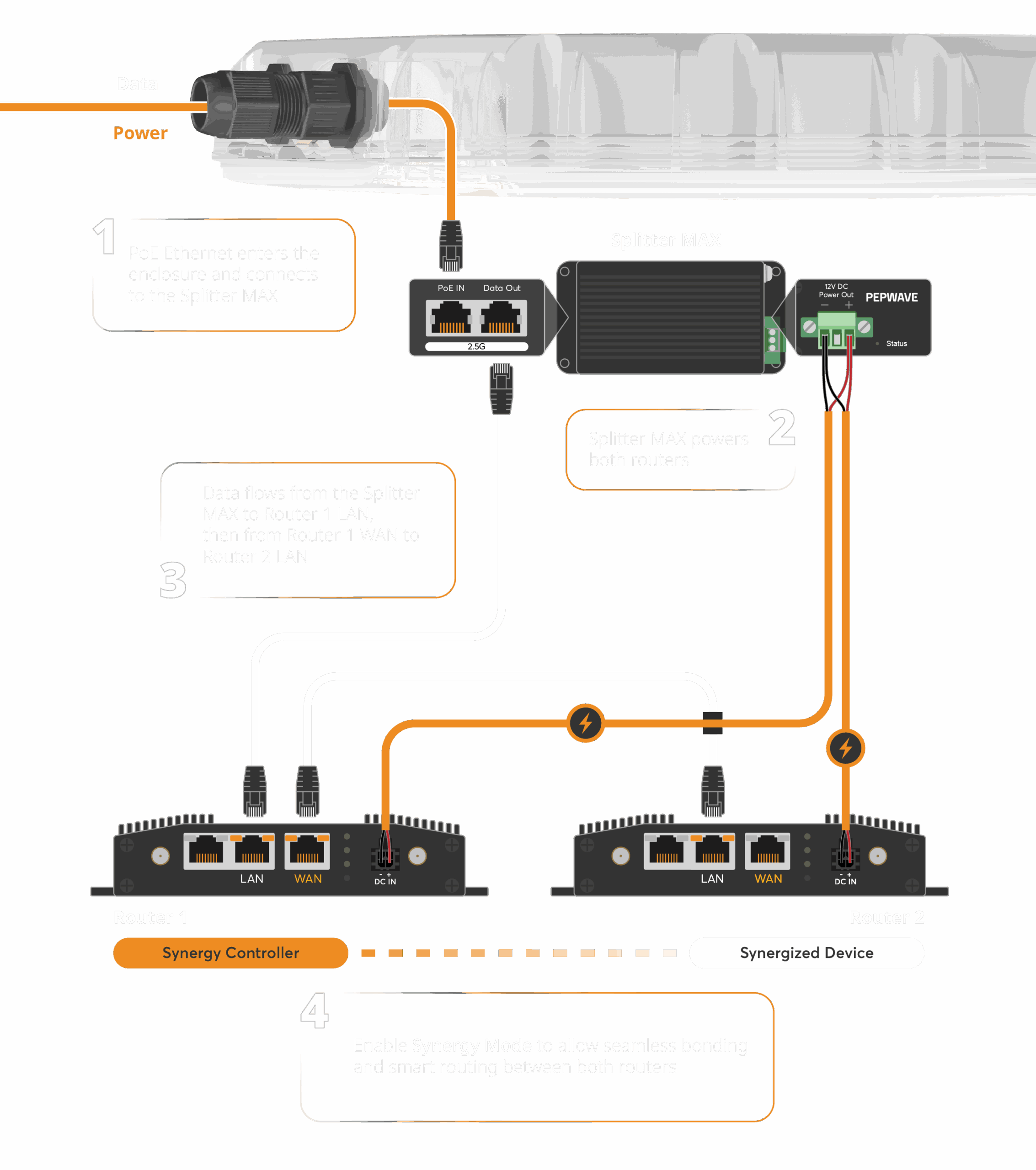
Peplink manufacturer image: Splitter MAX for two routers
POWER SUPPLY

Splitter MAX for two routers

The manufacturer drawing illustrates the cable route. When more than one router is used, a Splitter MAX is required for power over a single PoE cable.

Details in context ↗
Peplink manufacturer image: eight cellular elements
RADIO

Eight cellular elements

Eight 5G/LTE elements are complemented by two Wi-Fi elements and one GPS element; check the frequency bands against the device to be installed.

Details in context ↗
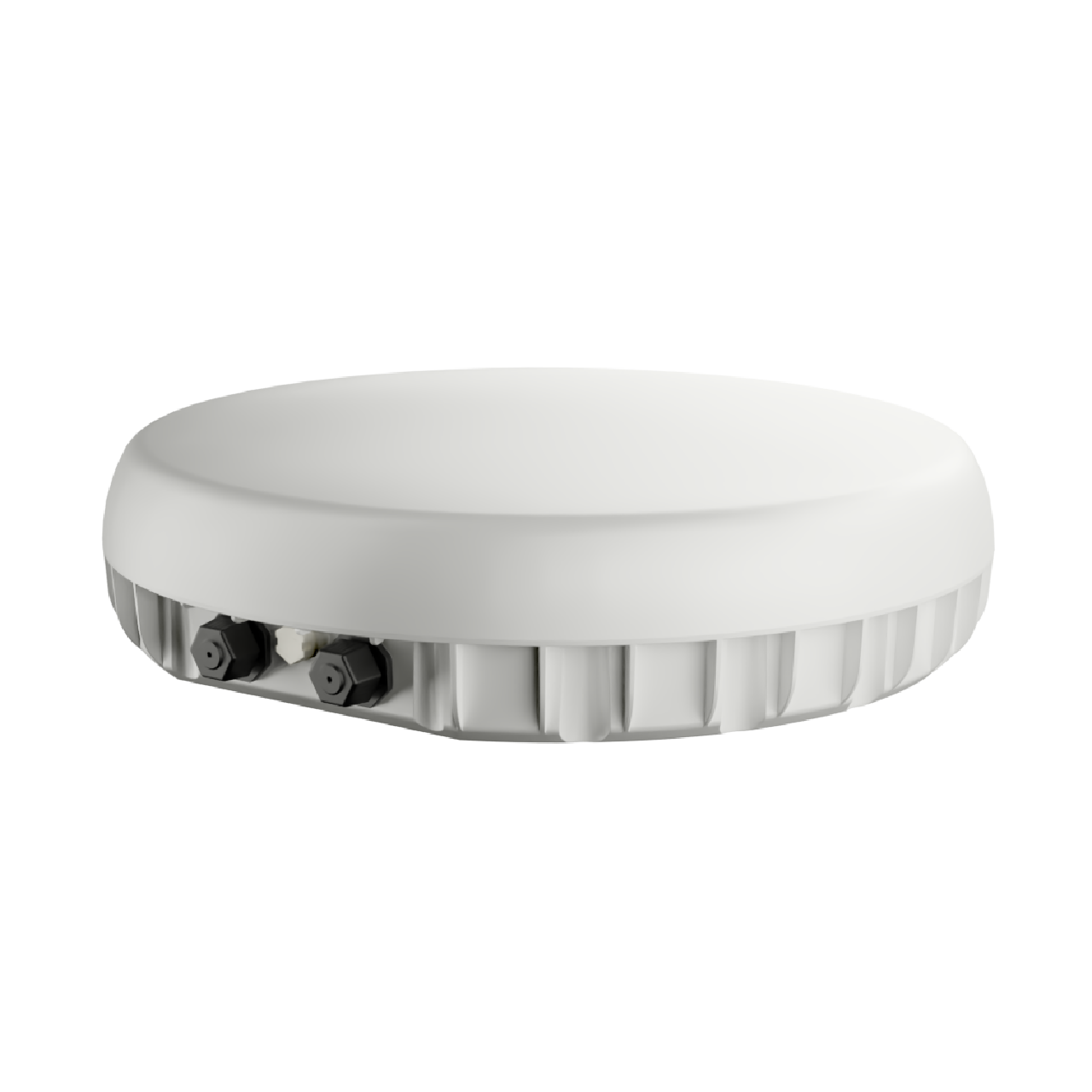
Peplink manufacturer image: weather-resistant design
ENCLOSURE

Weather-resistant design

The IP67 enclosure requires correctly installed cable glands and suitable mounting components.

Details in context ↗

A SOLUTION, NOT JUST A DEVICE

The right device in the right system.

Suitable hardware, available networks, power, licences and installation need to be planned together.

01 · BR2 PRO

One router, two modems

Check the BR2 Pro version and antenna assignment for two cellular paths against the manufacturer list.

BR2 Pro 5G: router details ↗
02 · TWO BR1 ROUTERS

Separate routers

Two BR1 Pro 5G routers are listed as a manufacturer-supported combination; plan the power supply, Splitter MAX and cable routing for the project.

BR1 Pro 5G: router details ↗
03 · MOUNTING

Vehicle or fixed location

Plan the pole, mounting surface, adhesive pad and cable glands for the actual loads and chosen mounting method.

Discuss mounting requirements ↗

MANUFACTURER IMAGES · HARDWARE

Ports, modules and installation.

Images illustrate options. The applicable specifications and compatibility are determined by the SKU, hardware version and datasheet.

Official Peplink graphic: space and antenna leads
DUAL-MODEM

Space and antenna leads

The manufacturer image shows the intended installation arrangement. Routers, modems, SIMs and service plans are separate components.

BR2 Pro, 2 × BR1 Pro 5G or BR1 Mini 5G + BR1 Pro 5G are examples from the current manufacturer list.

SINGLE-CABLE PATH

PoE with an additional splitter

When more than one router is installed, Peplink requires a Splitter MAX for the single-cable PoE path described here.

The graphic illustrates a schematic arrangement; it does not imply that a splitter is included or that availability is guaranteed.

Official Peplink graphic: PoE with an additional splitter

MANUFACTURER SPECIFICATIONS · Peplink Antenna MAX Duo

Key technical specifications.

Specifications and options apply only to the stated manufacturer's part number. Before ordering, check the hardware version, module, network and licence status.

Peplink Antenna MAX Duo technical specifications
Part numberANT-MAX-DUO
FunctionAntenna system with router enclosure; routers and modems supplied separately
Cellular8 × 5G/LTE antenna elements
Wi-Fi2 antenna elements
GPS1 antenna element
Cellular frequencies617–960 / 1410–2700 / 3400–4400 / 5000–6000 MHz
Ingress protection ratingIP67 according to Peplink
DimensionsØ 427.5 mm × 122.5 mm high
Temperature−40 to +80 °C according to the datasheet
Routers/modemsNot included in the antenna enclosure
Two routersSplitter MAX required for single-cable PoE
MountingL-Mount included; surface/VSAT dome mounts not included
Manufacturer figures; no guarantee of real-world wireless/WAN performance.Official datasheet ↗

Sources: Peplink product page ↗ · Peplink datasheet ↗

QUESTIONS BEFORE ORDERING

Frequently asked questions about Peplink Antenna MAX Duo.

Are two 5G modems built in?

No. The ANT-MAX-DUO enclosure contains antenna elements and space for suitable routers. A two-5G-modem setup requires an appropriately equipped BR2 Pro or a verified dual-router combination.

Which router combinations does Peplink list?

BR2 Pro, two BR1 Pro 5G routers or BR1 Mini 5G plus BR1 Pro 5G. Mechanical mounting, hardware version and connections must each be checked.

Is the Splitter MAX included?

It is not documented as part of the package for this antenna enclosure. For more than one router, the Peplink product page requires a Splitter MAX for single-cable PoE power.

Is every mounting kit included?

No. The L-Mount and specified small parts are included in the standard package; according to Peplink, the surface mount and third-party VSAT dome mount are not included.

WIRELESSMAXX · ADVICE

The right variant, not false promises.

We review architecture, compatibility, package contents and operation. The linked shop product is only a basis for pricing and purchase decisions for its actual SKU; contact us about configuration and a quotation.

Request a configuration ↗View Antenna MAX Duo in the shop ↗

Further options

Advice ↗Manufacturer website ↗Original datasheet ↗
  • Solutions
  • Knowledge Centre
  • eStore

Copyright © 2002 - 2026 wirelessmaxx

  • Imprint
  • Terms and Conditions