Skip to content
No results
  • Internetlösungen
    • Mein Unternehmensstandort
    • Meine mobilen Teams
    • Mein temporärer Einsatz
    • My backup connection
    • GO-Anschlussvarianten
  • Technologien
    • Starlink – Tarif & Service
    • Starlink-Terminals
    • Peplink – Router & Multi-WAN
    • Peplink MAX series
    • Hardware & Zubehör
  • Referenzen
    • Case Studies
    • WIFIROCKSTARS
    • Veranstaltungsorte
  • Wissen
    • Knowledge Centre
    • Technology, blog & news
  • Über uns
  • eStore
Contact us

PEPLINK · BRIEFLY EXPLAINED

What does SpeedFusion do?

SpeedFusion uses several suitable internet connections within a shared VPN tunnel. The three functions serve different purposes:

Bandwidth Bonding – use the bandwidth of multiple WAN connections for a shared data stream.

WAN Smoothing – send redundant packets to reduce the effects of packet loss and jitter. This requires additional bandwidth.

Hot Failover – preserve ongoing sessions through the remaining tunnel paths when a connection fails.

This requires compatible routers, a reachable endpoint, suitable WAN connections and the required features or licences. Uninterrupted availability is not guaranteed.


Read the full explanation

Kontaktieren Sie WirelessMaxx

Erzählen Sie uns von Ihrem Vorhaben. Wir unterstützen Sie bei der Auswahl und Planung Ihrer Business-Konnektivität.
  • Internetlösungen
    • connecting.works GO

      Ihr Anschluss. Als Lösung.

      Sie sagen uns, was funktionieren muss. Wir klären die passende Verbindung.

      Internetlösungen entdecken
      Für Ihren EinsatzMein UnternehmensstandortMeine mobilen TeamsMein temporärer EinsatzMein bestehender Anschluss

      Technik müssen Sie nicht auswählen.

      Wir beginnen mit Ihrem Bedarf – nicht mit Routermodellen.

      Anschluss besprechen
  • Technologien
    • Tarif & Service

      Starlink

      Business & EinsatzbereicheTerminals im ÜberblickTarif- & PaketberatungStarlink mieten
      Router & Multi-WAN

      Peplink

      Router & Produktfamilien5G-Adapter & AntennenBonding & AusfallsicherheitHardware & Zubehör im eStore
      Lieber eine komplette Anschlusslösung?connecting.works GO entdecken
  • Referenzen
    • Erfahrung aus Projekten

      Was Verbindungen möglich machen.

      Nachvollziehbare Projekte statt abstrakter Produktversprechen.

      Projekte & Events

      Case StudiesWIFIROCKSTARSVeranstaltungsorte
      Projektbeispiel

      FIA Kart-WM Wackersdorf

      Ein Einblick in die technische Konnektivität vor Ort.

      Originalbericht ansehen
  • Wissen
    • Wissen statt Fachchinesisch

      Verbindungen verstehen.

      Grundlagen in Ruhe erklären. Das vollständige Glossar bleibt im Wissenscenter.

      Wissenscenter öffnen

      Frequently asked questions

      Starlink Business vs. StandardFailover oder Bonding?SpeedFusion verständlich erklärt

      WIFIROCKSTARS Blog & News

      Einordnung und praktische Erfahrungen aus dem Netzwerkalltag.

      Beiträge ansehen
  • Über uns
  • eStore
  • German
Contact us

PEPLINK · B ONE 5G · BUILT-IN CELLULAR

Peplink B One 5GOne 5G modem. Two WAN ports. Clear options.

The B One 5G adds a built-in Sub-6 GHz 5G modem with two nano-SIM slots and eSIM options to the B One platform. Ethernet and Wi-Fi 6 remain part of the site network design.

Discuss your project ↗Technical specifications ↓

wirelessmaxx advises on network architecture, integration and quotations. To identify a suitable solution, we review the model variant, SIM and plan options, and your deployment location.

Official Peplink product image: Peplink B One 5G
Peplink manufacturer image · Peplink B One 5G
1 × 5Gbuilt-in modem
2 + 4GbE WAN + LAN
1 Gbit/sRouter throughput

Peak 5G figures are theoretical cellular modem rates, not routing throughput or guaranteed net performance.

FeaturesApplicationsHardwareSpecificationsQuestions

FEATURES · ORIGINAL PEPLINK GRAPHICS

5G, eSIM and Multi-WAN at a glance

The model with built-in cellular requires different plan, antenna and eSIM choices from the B One without built-in 5G. This page distinguishes hardware specifications from local network coverage.

Original Peplink graphic: Set up cellular connectivity correctly
5G / ESIM

Set up cellular connectivity correctly

The documentation specifies one built-in Sub-6 5G modem, two nano-SIM slots, and Peplink and BYO eSIM support. Check carriers, frequency bands and plans for Germany separately.

Further information ↗
Original Peplink graphic: Ethernet plus cellular
MULTI-WAN

Ethernet plus cellular

Two GbE WAN ports, 5G and USB-C WAN provide several connection options. Wi-Fi 6 can be used as an access point or WAN connection.

Further information ↗
Original Peplink graphic: Four LAN ports
PORT ROLES

Four LAN ports

Four GbE LAN ports serve local devices. The datasheet lists no PoE, SFP port, module slot or rack-mount option.

Further information ↗
Original Peplink graphic: Resilience depends on the setup
PRIMECARE

Resilience depends on the setup

SpeedFusion Hot Failover, Smoothing and Bonding require PrimeCare; active connections, the remote endpoint and configuration affect actual performance.

Further information ↗

ARCHITECTURE RATHER THAN A STANDALONE DEVICE

Using B One 5G with fixed-line internet and Starlink

The right hardware alone is no substitute for a WAN strategy or for checking the remote endpoint, tariff, power supply and operation.

01 · SITE

Add cellular to fixed-line internet

An Ethernet uplink and the built-in 5G modem can be planned as separate connection paths. Cellular coverage and service plans are checked for the location.

Get advice on your site connection ↗
02 · STARLINK

Satellite as an external WAN path

Starlink can be integrated as an additional Ethernet connection. At wirelessmaxx, the terminal, service plan and support package are considered together; terminals are not sold on their own.

Further information ↗
03 · SIM OPERATION

Two slots, one modem

The two nano-SIM slots serve a single 5G modem; this is not a dual-5G router. RemoteSIM and FusionSIM are available from hardware version 2 onwards.

Further information ↗

ORIGINAL IMAGES · ACTUAL HARDWARE

Connections and options, explained precisely.

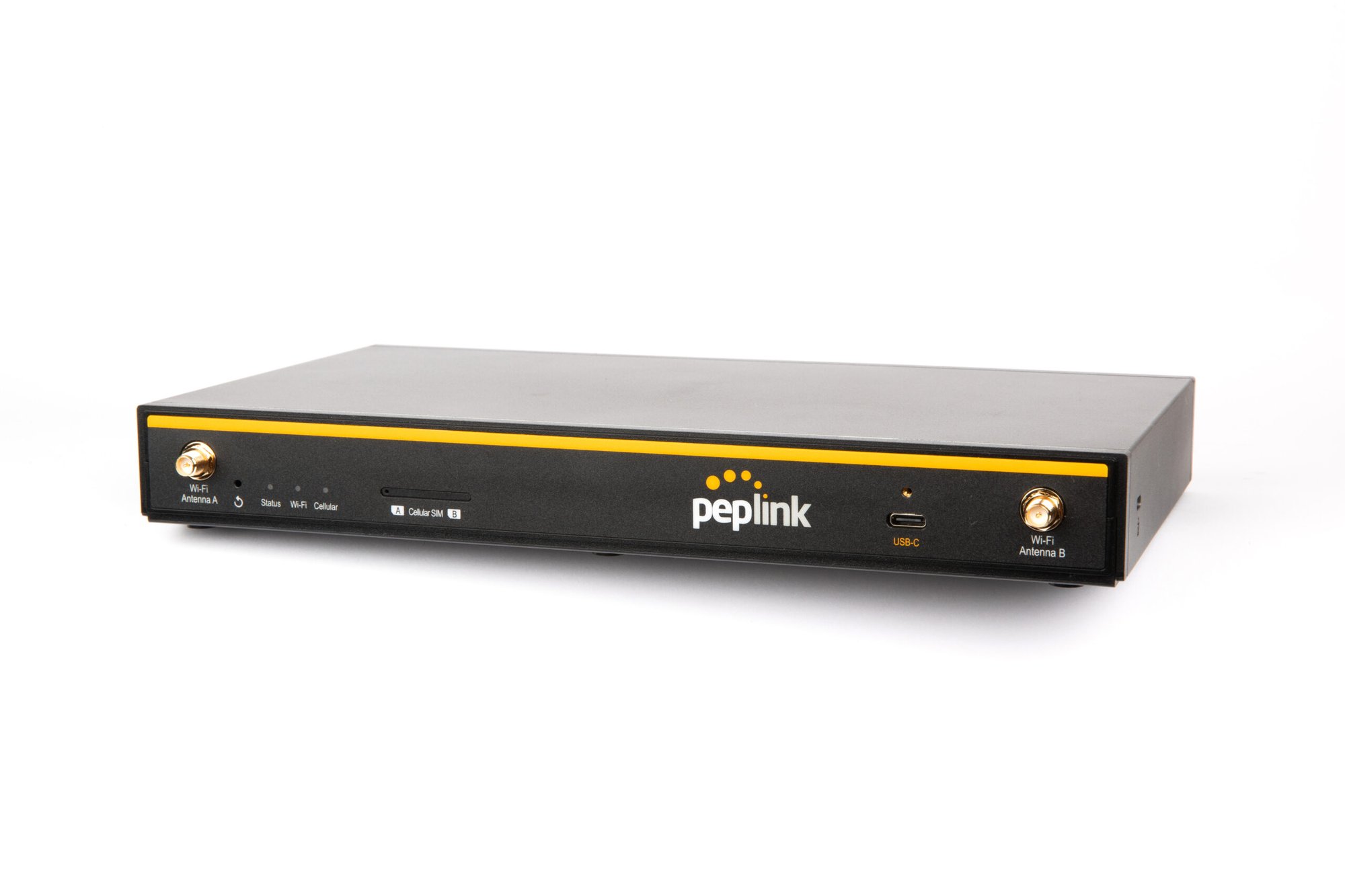
Peplink product images show the hardware; the interfaces described apply only to this model and the specified revisions.

Official Peplink hardware graphic for Peplink B One 5G: Connection paths, not just port counts.
ETHERNET & WAN

Connection paths, not just port counts.

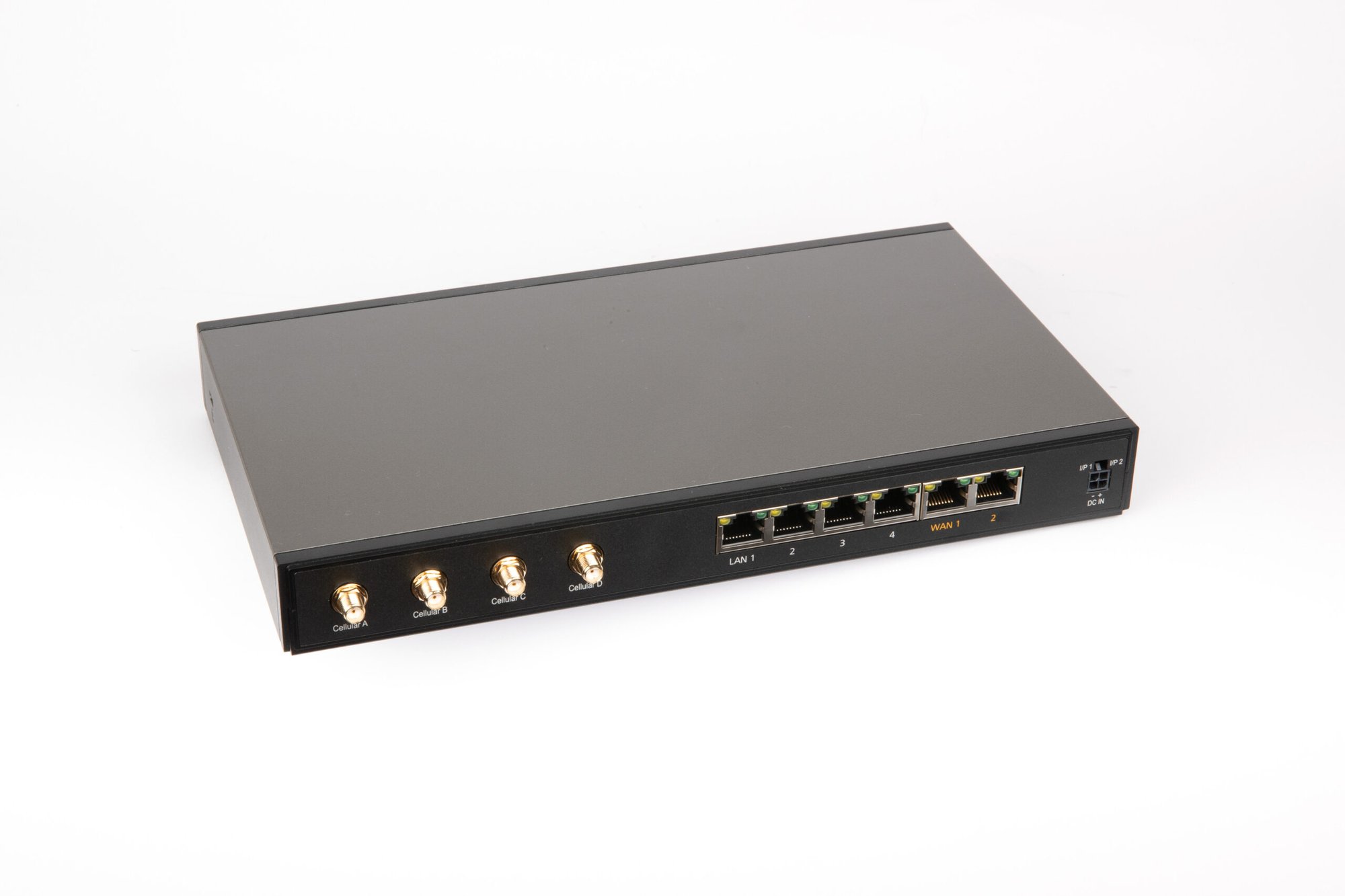
The original B One 5G image illustrates its connection layout: 2 × GbE WAN, 4 × GbE LAN and USB-C WAN. Wi-Fi WAN may provide another option.

This does not imply a guaranteed switchover time or guaranteed carrier compatibility.

SIM & ESIM

Choose your cellular option carefully.

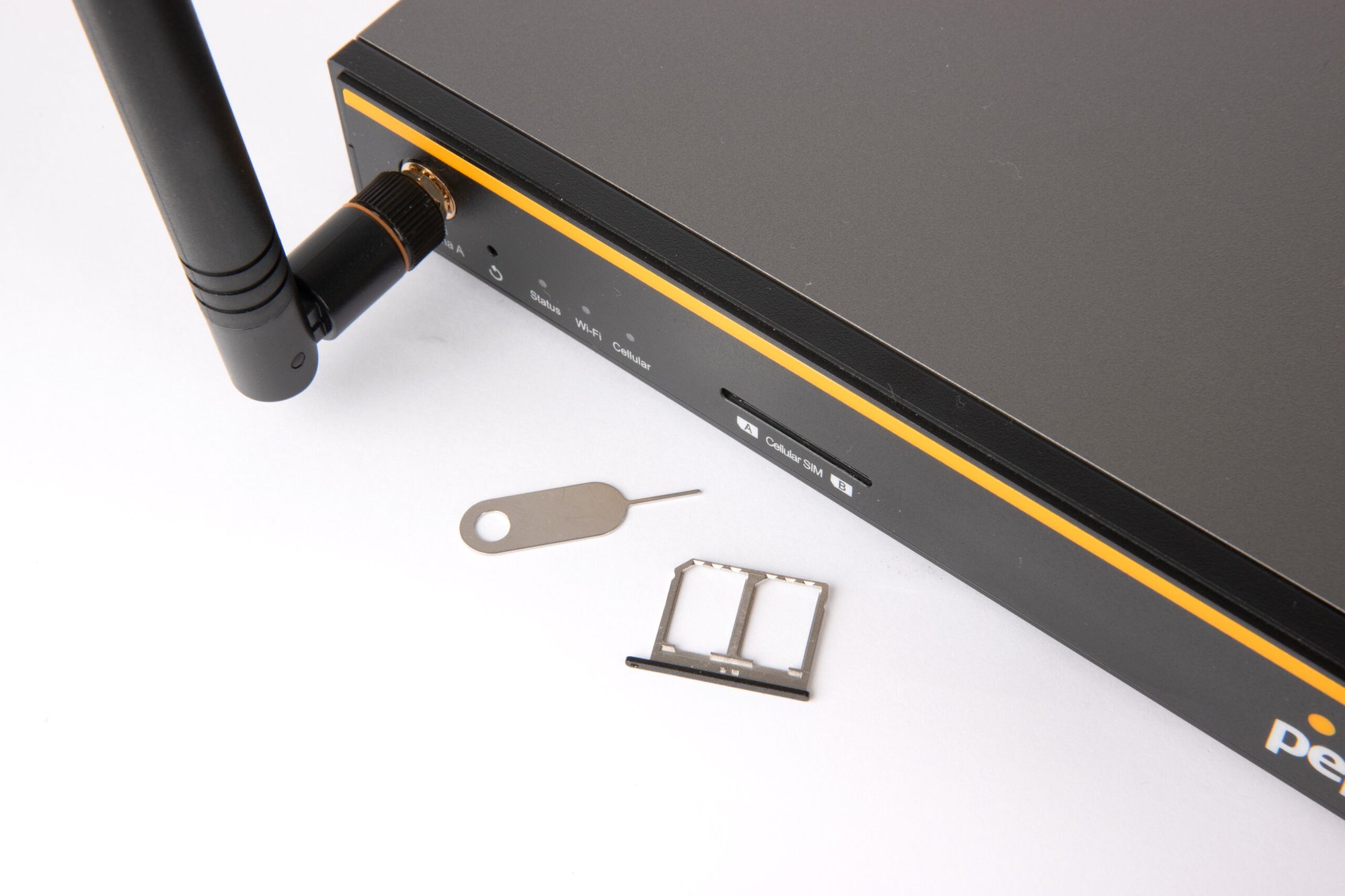
The device has one Sub-6 5G modem and two physical nano-SIM slots. Peplink eSIM and BYO eSIM support are also specified.

Before preparing a quotation, verify the hardware revision, firmware version, cellular contract and frequency bands at the deployment location.

Official Peplink hardware graphic for Peplink B One 5G: Choose your cellular option carefully.

MANUFACTURER SPECIFICATIONS · Peplink B One 5G

Key technical specifications.

Extract from the current Peplink documentation. Before quoting, cross-check the SKU, hardware version, firmware, licence, frequencies and deployment environment.

Peplink B One 5G technical specifications
ModelPeplink B One 5G; 5G SA/NSA Sub-6 GHz, one built-in 5G modem
Router throughputup to 1 Gbit/s under manufacturer test conditions
SpeedFusion VPNup to 400 Mbit/s without encryption / 200 Mbit/s with 256-bit AES
5G modem ratetheoretically up to 3.4 Gbit/s downlink / 0.9 Gbit/s uplink; no guarantee of real-world performance
Ethernet / USB2 × GbE WAN, 4 × GbE LAN, 1 × USB-C for USB WAN
SIM / eSIM2 × nano-SIM; Peplink eSIM and BYO eSIM; RemoteSIM/FusionSIM from HW2
Wi-Fisimultaneous 2.4-/5-GHz 2×2 Wi-Fi 6; AP and Wi-Fi WAN
PoE / SFP / moduleno PoE input or output; no SFP or module slot
SpeedFusion licenceHot Failover, Smoothing and Bonding require PrimeCare; first year complimentary according to the datasheet
SpeedFusion peers2 as standard, 5 with PrimeCare; 10/20 with the appropriate additional licence
Manufacturer specifications; actual values vary depending on test conditions and configuration.Official datasheet ↗

Source: Peplink product page ↗ · Peplink datasheet ↗

DECISION GUIDE

Frequently asked questions about Peplink B One 5G.

Do both SIM cards act as separate 5G modems at the same time?

No. The B One 5G has one built-in 5G modem with two nano-SIM slots for selecting a suitable profile or carrier.

Is 3.4 Gbit/s the router or internet speed?

No. 3.4 Gbit/s downlink is a theoretical maximum modem rate. The specified routing throughput is up to 1 Gbit/s; real-world wireless performance varies.

Does SpeedFusion require PrimeCare?

Hot Failover, Smoothing and Bandwidth Bonding require PrimeCare. Peplink states that the first year is complimentary; subscription term and included features should be checked afterwards.

Are PoE or SFP available?

No. Neither PoE input/output nor SFP or module expansion is specified for this model.

Is compatibility with a German cellular carrier guaranteed?

No. The specific variant, frequency bands, SIM/eSIM profiles, carrier and service plan must be checked before deployment in Germany.

WIRELESSMAXX · ADVICE

From hardware to a resilient connection.

We review suitable WAN connections, SIM and plan options, SpeedFusion endpoints and the hardware revision. We take your deployment location into account when preparing a quotation. Plan your internet connection with connecting.works GO.

Enquire about availability & request a quote ↗

Further options

Request advice ↗Starlink with tariff & service ↗Manufacturer website ↗
  • Solutions
  • Knowledge Centre
  • eStore

Copyright © 2002 - 2026 wirelessmaxx

  • Imprint
  • Terms and Conditions