Skip to content
No results
  • Internetlösungen
    • Mein Unternehmensstandort
    • Meine mobilen Teams
    • Mein temporärer Einsatz
    • My backup connection
    • GO-Anschlussvarianten
  • Technologien
    • Starlink – Tarif & Service
    • Starlink-Terminals
    • Peplink – Router & Multi-WAN
    • Peplink MAX series
    • Hardware & Zubehör
  • Referenzen
    • Case Studies
    • WIFIROCKSTARS
    • Veranstaltungsorte
  • Wissen
    • Knowledge Centre
    • Technology, blog & news
  • Über uns
  • eStore
Contact us

PEPLINK · BRIEFLY EXPLAINED

What does SpeedFusion do?

SpeedFusion uses several suitable internet connections within a shared VPN tunnel. The three functions serve different purposes:

Bandwidth Bonding – use the bandwidth of multiple WAN connections for a shared data stream.

WAN Smoothing – send redundant packets to reduce the effects of packet loss and jitter. This requires additional bandwidth.

Hot Failover – preserve ongoing sessions through the remaining tunnel paths when a connection fails.

This requires compatible routers, a reachable endpoint, suitable WAN connections and the required features or licences. Uninterrupted availability is not guaranteed.


Read the full explanation

Kontaktieren Sie WirelessMaxx

Erzählen Sie uns von Ihrem Vorhaben. Wir unterstützen Sie bei der Auswahl und Planung Ihrer Business-Konnektivität.
  • Internetlösungen
    • connecting.works GO

      Ihr Anschluss. Als Lösung.

      Sie sagen uns, was funktionieren muss. Wir klären die passende Verbindung.

      Internetlösungen entdecken
      Für Ihren EinsatzMein UnternehmensstandortMeine mobilen TeamsMein temporärer EinsatzMein bestehender Anschluss

      Technik müssen Sie nicht auswählen.

      Wir beginnen mit Ihrem Bedarf – nicht mit Routermodellen.

      Anschluss besprechen
  • Technologien
    • Tarif & Service

      Starlink

      Business & EinsatzbereicheTerminals im ÜberblickTarif- & PaketberatungStarlink mieten
      Router & Multi-WAN

      Peplink

      Router & Produktfamilien5G-Adapter & AntennenBonding & AusfallsicherheitHardware & Zubehör im eStore
      Lieber eine komplette Anschlusslösung?connecting.works GO entdecken
  • Referenzen
    • Erfahrung aus Projekten

      Was Verbindungen möglich machen.

      Nachvollziehbare Projekte statt abstrakter Produktversprechen.

      Projekte & Events

      Case StudiesWIFIROCKSTARSVeranstaltungsorte
      Projektbeispiel

      FIA Kart-WM Wackersdorf

      Ein Einblick in die technische Konnektivität vor Ort.

      Originalbericht ansehen
  • Wissen
    • Wissen statt Fachchinesisch

      Verbindungen verstehen.

      Grundlagen in Ruhe erklären. Das vollständige Glossar bleibt im Wissenscenter.

      Wissenscenter öffnen

      Frequently asked questions

      Starlink Business vs. StandardFailover oder Bonding?SpeedFusion verständlich erklärt

      WIFIROCKSTARS Blog & News

      Einordnung und praktische Erfahrungen aus dem Netzwerkalltag.

      Beiträge ansehen
  • Über uns
  • eStore
  • German
Contact us

PEPLINK · MODEL ADVICE

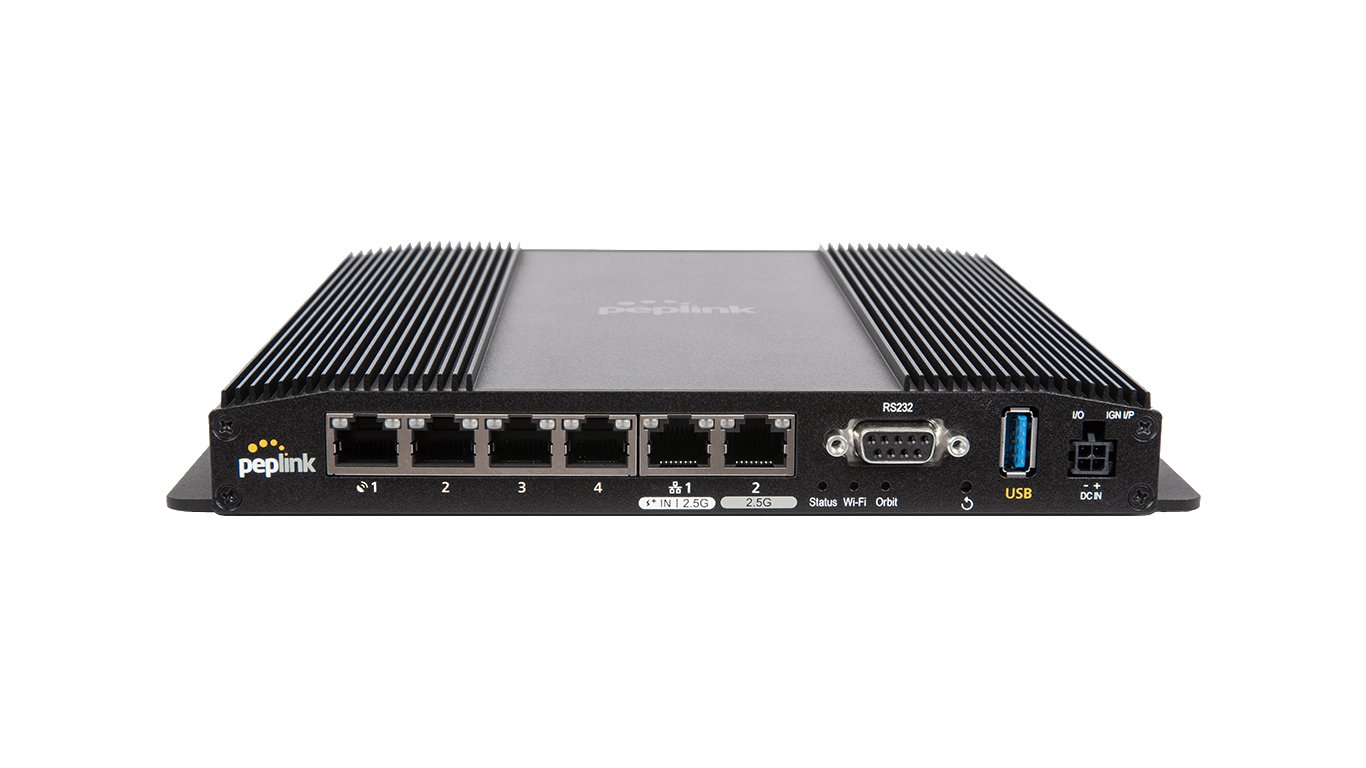
Peplink MAX Orbit 4Four Orbit ports for external satellite terminals.

MAX Orbit 4 offers four Gigabit Orbit ports plus two 2.5GbE WAN/LAN ports. Satellite terminals and mobile network hardware are external sources, not part of the router.

Discuss your project ↗

Please contact us to discuss a quotation and availability for the Peplink MAX Orbit 4.

Peplink manufacturer device: Peplink MAX Orbit 4
Original Peplink product image · Peplink MAX Orbit 4
4 × GE OrbitModel feature
2 × 2.5GbETechnology
PoE input onlyDecision boundary

Manufacturer code: MAX-ORB-4-T-PRM. All throughput and wireless figures are laboratory or manufacturer specifications, not guarantees of real-world network performance.

FeaturesApplicationsHardwareSpecificationsQuestions

ORIGINAL PEPLINK GRAPHICS

Four Orbit ports, external modems and PoE input.

MAX Orbit 4 offers four Gigabit Orbit ports plus two 2.5GbE WAN/LAN ports. Satellite terminals and mobile network hardware are external sources, not part of the router.

Peplink image: Peplink MAX Orbit 4
Orbit / WAN

Orbit / WAN

Four dedicated 1 Gbit/s Ethernet Orbit ports for external satellite terminals; plus two 2.5 Gbit/s Multi-Gig WAN/LAN ports, one with 802.3at PoE+ input, and USB 3.0.

Check the datasheet ↗
Peplink image: Peplink MAX Orbit 4
External terminals / modems

External terminals / modems

No built-in satellite terminal or cellular/5G modem; satellite, 5G/LTE or FWA connections are provided by external devices connected via Ethernet or USB.

Check the datasheet ↗
PoE input only
PoE input

PoE input

Power: 12V DC, 3A, 4-pin power supply; alternatively 10–30V DC via Micro-Fit or 802.3at PoE input. Power consumption: 11W nominal / 14W maximum excluding USB output.

Check the datasheet ↗

ARCHITECTURE, NOT UNVERIFIED PERFORMANCE PROMISES

Combine external satellite WANs and cellular connections.

Coordinate multiple external satellite WANs, with an additional 5G Ethernet source where appropriate.

PLANNING

Networks and location

Available satellite and cellular connections, their service plans and power supply are assessed for the actual deployment site. External terminals and modems need a suitable power supply.

Project discussion ↗
MODEL DISTINCTIONS

These are not interchangeable

Orbit ports do not supply PoE power to terminals; 802.3at is the router’s PoE input.

Manufacturer product page ↗
SATELLITE + SERVICE PLAN

Starlink only with a tariff/service

wirelessmaxx offers Starlink terminals only with a service plan and support. The terminal, service plan and Peplink integration are planned together; connecting.works GO is the starting point for a complete connectivity solution.

More on planning ↗

MANUFACTURER IMAGE · Peplink MAX Orbit 4

Plan connections and power supply correctly.

The original graphic is an illustration. The exact order code and the official datasheet are authoritative.

Official Peplink hardware illustration: Peplink MAX Orbit 4
MAX-ORB-4-T-PRM

Match hardware correctly.

External satellite terminals connect via Ethernet to the four Gigabit Orbit ports. An additional Ethernet source can be connected to one of the two 2.5GbE ports if it is configured as WAN in Web Admin.

The Orbit ports do not supply PoE power to terminals; their power supply must be planned separately. The router is powered through the 12V power supply, 10–30V DC at the Micro-Fit connector or the designated 802.3at PoE input.

MANUFACTURER SPECIFICATIONS · Peplink MAX Orbit 4

Technical specifications and SpeedFusion performance figures.

Reference: MAX-ORB-4-T-PRM. Manufacturer specifications do not automatically apply to other variants, hardware generations or service plans.

Peplink MAX Orbit 4 technical specifications
Model and hardwarePeplink MAX Orbit 4
Peplink order codeMAX-ORB-4-T-PRM
Orbit / WANFour dedicated 1 Gbit/s Ethernet Orbit ports for external satellite terminals; plus two 2.5 Gbit/s Multi-Gig WAN/LAN ports, one with 802.3at PoE+ input, and USB 3.0.
External terminals / modemsNo built-in satellite terminal or cellular/5G modem; satellite, 5G/LTE or FWA connections are provided by external devices connected via Ethernet or USB.
Wi-Fi / GPSWi-Fi 6, simultaneous dual-band 2.4/5 GHz, 2×2 MU-MIMO; 2 RP-SMA Wi-Fi connectors and 1 SMA GPS connector; integrated GPS.
Routing / VPNRouter throughput up to 1 Gbit/s; SpeedFusion VPN up to 400 Mbit/s without encryption or 200 Mbit/s with 256-bit AES; 2 VPN peers as standard, 5 with PrimeCare, 10/20 via PVN-LC-10/PVN-LC-20.
EdgeRecommended users: 1–150. Docker/edge computing with 8GB of internal storage and USB expansion. AP/switch controller supports up to 30 APs as standard, or up to 50 with AP-LC-50.
PoE inputPower: 12V DC, 3A, 4-pin power supply; alternatively 10–30V DC via Micro-Fit or 802.3at PoE input. Power consumption: 11W nominal / 14W maximum excluding USB output.
Package contentsPackage contents according to the official source: MAX Orbit 4, 12 V DC 3 A 4-pin power supply, two dual-band Wi-Fi antennas and one GPS antenna; 1-year limited warranty.
Manufacturer specifications, not guaranteed performance at the site. SpeedFusion verständlich erklärtPeplink datasheet ↗

Official primary sources: Peplink product page ↗ · Peplink datasheet ↗

QUESTIONS BEFORE PURCHASE

Frequently asked questions about Peplink MAX Orbit 4.

Which order code applies to MAX Orbit 4?

The Peplink order code for MAX Orbit 4 is MAX-ORB-4-T-PRM.

Are wireless, port and performance specifications guaranteed real-world figures?

No. Manufacturer specifications depend on the model and, in some cases, the configuration. The datasheet, specific hardware version, frequency/network availability and power supply take precedence.

Can I buy this exact version directly?

Please contact us to discuss a quotation and availability for the Peplink MAX Orbit 4.

WIRELESSMAXX · ADVICE

The right model, not just a similar name.

We clarify network architecture, SKU, power, mounting and service before ordering. Orbit ports do not supply PoE power to terminals; 802.3at is the router’s PoE input.

Request a quote & integration ↗

Sources and next steps

Peplink MAX Orbit series overview ↗connecting.works GO: connectivity solution ↗Advice ↗Peplink model ↗Original datasheet ↗
  • Solutions
  • Knowledge Centre
  • eStore

Copyright © 2002 - 2026 wirelessmaxx

  • Imprint
  • Terms and Conditions